
In 2011 I helped move The Hill Times off Drupal™. It’s Canada’s Parliament newspaper, it had been on Drupal for years, and it had two things that couldn’t break: tens of thousands of article URLs cited in committee documents and policy research, and a paying subscriber base that was the business. Both survived. Readers noticed nothing, which is the entire job.
I mention it because most of what’s written about moving from Drupal to WordPress is written by people selling the move. This is the version I’d give you over coffee, including the parts where I’d tell you to stay put.
If your site is a genuinely complex data model with a strict editorial workflow and forty distinct roles, Drupal is doing real work for you, and I'd want a good reason before moving any of it.
What Drupal does genuinely well
Drupal earned its place, and it’s worth being fair about that before talking about leaving it. Its content modelling is stronger than WordPress out of the box. If you need a dozen interrelated content types with real referential structure between them, Drupal gives you that natively where WordPress asks you to build it. The permission system is more granular. Multilingual handling has been properly built in since Drupal 8; it stopped being a bolt-on years ago. Governments and universities didn’t choose it by accident.
If your site is a genuinely complex data model with a strict editorial workflow and forty distinct roles, Drupal is doing real work for you, and I’d want a good reason before moving any of it.
Where it starts to cost you
The pinch usually isn’t technical. It’s staffing and rhythm.
Drupal developers cost more and take longer to find. That’s a market fact rather than a criticism of the software. When your Drupal developer moves on, replacing them takes longer than replacing a WordPress developer would, and while you’re looking, small changes queue up behind bigger ones.
Major version upgrades are the other pressure. The Drupal 7 to 8 transition was effectively a rebuild for a lot of sites, and organisations that deferred it spent years on an unsupported version while the decision got larger every month. Drupal publishes its core release-cycle policy in the open, so end-of-support dates are knowable years ahead. If you’re sitting on an old major version today, you’re already committed to paying for a migration. The only open question is which one you’re paying for.
Then there’s the daily experience. In most of the Drupal sites I’ve been called into, the communications team can’t publish a landing page without filing a ticket. That’s a configuration decision more than a Drupal decision, but it’s the lived reality that eventually starts the conversation.
The two things you can’t afford to break
Almost everything in a migration is recoverable if it goes wrong. These two aren’t, so they get planned first and everything else arranges itself around them.
Every URL that already exists
If you’ve been on Drupal for years, your content is indexed, cited, bookmarked and linked from places you will never fully inventory. On the Hill Times that included House of Commons committee documents. Break those URLs and you break the link economy the publication runs on, and no amount of post-launch cleanup gets all of it back.
The work itself is unglamorous. Drupal path aliases get extracted and re-created as WordPress rewrites. Canonical article URLs are preserved exactly rather than regenerated from whatever permalink structure the new site would have chosen. Tag, author and category archives get mapped pattern for pattern. Then there’s the long tail: URL formats from older Drupal versions that still carry inbound links, caught by fallback rules so they land somewhere sensible instead of on a 404.
After launch, walk the most-linked URLs and confirm each one resolves to the same content it used to. A botched URL migration shows up as a traffic cliff inside 48 hours, so your analytics are the live test. On the Hill Times there was no cliff, and that was the number I cared about.
Anyone who logs in or pays you
If your Drupal site has accounts, and especially if it has paid accounts, that list is the asset. The site is just how people reach it. That is the shape of most of my work with publishers: the subscriber base is the business, and the website is the way people get to it.
A naive migration asks everyone to re-register and re-enter a card. You’d lose a real share of them to nothing more than friction, because re-entering a credit card is exactly the step that turns “I’ll do that later” into “I never did that.”
On the Hill Times, subscribers moved into Stripe as customer objects with their payment methods tokenised and attached, and subscription state was preserved so nobody was double-charged and nobody quietly skipped a renewal. The comp accounts, meaning staff, board members and journalists who had never gone through billing at all, came across as WordPress users with the right capabilities and stayed out of the billing flow entirely.
If your Drupal site is brochureware with no logins, you can skip this section happily. If it isn’t, this is the part that decides whether the project is remembered as a success.
What survives the move
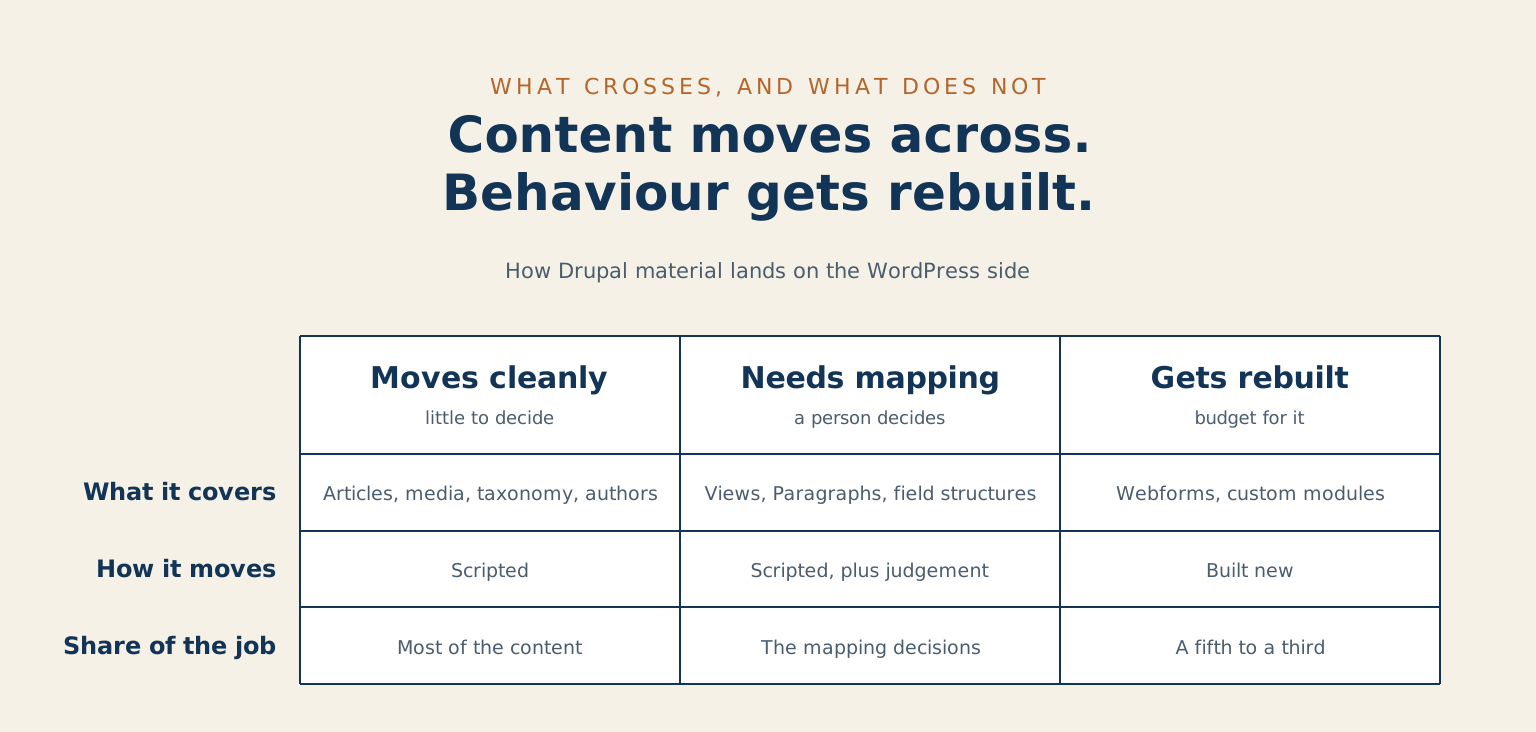
The straightforward part: articles and pages, images and documents, taxonomy structure, authors, publication dates, and most of your content model if someone maps it deliberately rather than hoping an importer guesses right.
The part that needs real work: Views. Drupal’s Views are a query builder with no direct WordPress equivalent, so each one becomes a template or a custom query on the other side. Paragraphs and complex field structures are the same story. They map onto WordPress blocks and custom fields perfectly well, but “map onto” means a person sits down and decides the mapping.
The part that usually gets rebuilt: webforms, custom modules, and any workflow built on Drupal-specific contributed modules. That isn’t a shortcoming in either system. It’s what happens any time two platforms have genuinely different content models, and it’s the same conversation I have about moving off Moodle.
| Moves by script | Needs a mapping decision | Gets rebuilt |
|---|---|---|
| Articles and pages | Views, each becoming a template or a custom query | Webforms |
| Images and documents | Paragraphs and complex field structures, onto blocks and custom fields | Custom modules |
| Taxonomy, authors and publication dates | Most of the content model, if a person maps it deliberately | Workflow built on Drupal-specific contributed modules |
| The cheap part of the budget | Where the judgement calls sit | Roughly a fifth to a third of the job |
What the migration looks like in practice
Audit before anyone prices anything. Count your content by shape, not by page. Twenty thousand articles that are all the same shape is a smaller project than four hundred pages with fifteen different field structures between them. Counting pages tells you almost nothing about the work. Counting shapes tells you what the project is.
The audit also surfaces what nobody wants to bring along. Drupal sites accumulate content types that haven’t been used since 2016 and sections everyone forgot were published. Deciding what stays behind is one of the cheapest hours in the whole project, and it’s cheapest at the start.
After that, roughly in order: build the content model on the WordPress side, script the content migration and run it against staging repeatedly until it’s boring, build the redirect map alongside the content while every pattern is still in front of you, migrate accounts, then rehearse the cutover.
That last one earns its own sentence. Rehearse the cutover end to end on staging with real data, and time it. The first time you run it shouldn’t be the time that counts.
What it costs, honestly
I won’t give you one number, because the honest range is wide and anyone quoting a Drupal migration off a page count is guessing.
What moves the number: how many distinct content shapes you have, whether accounts and payments are in scope, how many URL patterns need mapping, whether a redesign is happening at the same time, and how much of your current functionality lives in custom modules. On the redesign question I’d sequence it separately, for the reasons I set out on the migration service page.
A useful planning figure: expect to rebuild rather than migrate somewhere between a fifth and a third of the functionality. Content moves across. Behaviour gets rebuilt. If Views and custom modules carry a lot of the load on your current site, that share climbs.
If you want a number you can take to a budget meeting before hiring anyone, count your content shapes and your URL patterns yourself. Those two numbers do most of the work in any quote you receive, and having them in hand changes the conversation from a guess into a scope. It also lets you compare two proposals on the same basis, which is harder than it sounds when each one counts the project differently.
Then apply the three-year test. If the move doesn’t pay for itself inside three years through staffing, hosting, or the work your team can finally do without filing a ticket, it’s a want rather than a plan. Wanting it is fine. It’s just worth calling it what it is before the budget conversation rather than during.
When staying on Drupal is the right answer
Stay if the content model is genuinely complex and genuinely used. Thirty interrelated content types with real referential integrity and an approval workflow that matches how your organisation signs things off is work WordPress can do, but you’d be rebuilding something that already works to get there.
Stay if you’ve just finished a major version upgrade. You’ve already paid the expensive part. Get some good years out of it before spending again.
Stay if the real complaint is that the admin looks dated. That’s a theme problem, and it comes with a much smaller invoice than a migration does.
Move when the staffing arithmetic has turned against you, when an unsupported version is forcing the decision anyway, or when the public-facing side of your site is doing strategic work that your own team can’t touch without booking a developer.
Common questions about moving off Drupal
Will my URLs really survive? Yes, if URL preservation is written down as a requirement at the start rather than handled in the last week. Every legacy pattern gets mapped, the long tail gets fallback rules, and the most-linked URLs get walked after launch to confirm. That’s the approach behind the Hill Times migration, where the paper’s archive was cited widely enough that breaking it wasn’t an option.
How long does it take? Longer than the content move suggests, because the content move is the easy half. Plan around the audit, the redirect map, the account migration and a rehearsed cutover, and let those set the schedule; the article count is the wrong clock. If you’d like a realistic timeline for your own catalogue, tell me what you’re running and I’ll give you a straight answer.
Can we run both systems during the transition? For a period, yes, and it’s often the calmer path. The usual shape is WordPress serving the public site while Drupal keeps running whatever internal workflow hasn’t been rebuilt yet, with the redirect layer sitting in front of both. It costs a little more in the middle and takes most of the drama out of launch night.
What happens to our search rankings? Handled properly, they hold. The traffic cliff people fear comes from broken URLs and missing redirects. Preserve the URLs and the content, keep the internal linking sensible, and search engines carry on treating the site as the same site it always was.
Do we have to move everything at once? No, and on a large catalogue I would rather you didn’t. The usual approach is to move the public-facing content first, where the value and the risk both sit, and leave internal workflow on Drupal until its replacement is genuinely ready. Phasing costs a little more in total and removes the scenario where one delayed piece holds the entire launch date hostage.
Leave a reply