Accessibility is part of whether a website is genuinely useful. If a site is harder to use because someone reads with a screen reader, navigates by keyboard, zooms the page, prefers reduced motion, or just needs plainer language, then the site is failing the people it claims to serve. That applies to this site, and it applies to the work delivered for clients.
Statistics Canada counted 8.0 million people, 27 percent of Canadians aged 15 and over, living with one or more disabilities that limit them in their daily activities (Canadian Survey on Disability, 2022, reported 1 December 2023). That number is about daily life rather than about websites specifically, and I will not stretch it into a web statistic. It is here so the scale is clear. If you are deciding whether to pay for this, the question is not whether a standard was met. It is whether the people in that count can finish what they came to your site to do. What follows is how I try to make sure they can, and what to do when I get it wrong.
The standard this site targets
This site targets WCAG 2.2 level AA. That means readable contrast, visible focus states, semantic structure, alt text on meaningful images, keyboard-reachable controls, content that still works at 200% zoom, and respect for reduced-motion preferences.
This site does not claim perfection. WCAG conformance is a moving target across hundreds of pages, third-party embeds, and content that changes weekly. The commitment is that accessibility barriers are treated as real bugs, not edge cases.
What is committed
- Plain language. Concepts are introduced before fixes are explained. Jargon and acronyms are spelled out the first time they appear.
- Keyboard and screen-reader respect. Every interactive control should be reachable without a mouse, have a meaningful label, and announce its state.
- Visible focus. If you Tab to something, you should see where you are.
- Reduced motion. Animations respect the
prefers-reduced-motionsetting. Nothing on this site should flash, strobe, or auto-play with sound. - Predictable interaction. Important or destructive actions are clearly labelled and reversible where it makes sense. No surprise modals, no hijacked scroll, no dark patterns.
- Honest documentation. When something on the site is not yet accessible, that is stated rather than glossed over.
How this site is tested
Testing is layered. No single tool catches everything, and an automated pass alone is not a conformance claim.
- Automated checks using axe DevTools and Lighthouse on representative templates: landing pages, articles, glossary entries, archives, and forms.
- Keyboard-only smoke test on every changed template. Tab order is logical, focus is always visible, no keyboard trap, every interactive control reachable and operable.
- Screen-reader pass with NVDA on Windows for new or significantly changed flows, and VoiceOver on macOS for any iOS-targeted change. Headings, landmarks, and form labels are announced as intended.
- Contrast verified against the rendered values, not just the design tokens, at the actual sizes and weights used in production CSS.
- Reduced-motion check with the OS-level preference enabled, to confirm animations either pause, shorten, or are removed.
- Zoom and reflow at 200% browser zoom on desktop and at small mobile widths, with no horizontal scroll on body content.
Fix timelines
When an accessibility issue is reported or discovered in testing, it is triaged by impact:
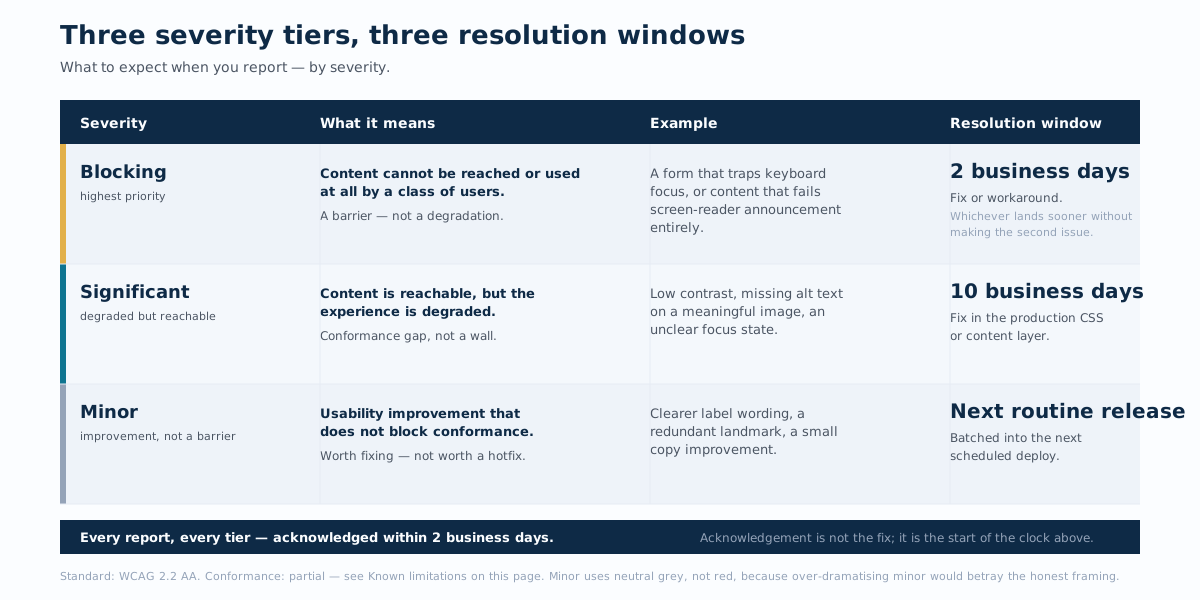 Triage table mapping three accessibility severity tiers to their resolution windows. Blocking: content cannot be reached or used at all by a class of users (example: a form that traps keyboard focus); resolution within 2 business days. Significant: content reachable but degraded (example: low contrast or missing alt text); resolution within 10 business days. Minor: usability improvement that does not block conformance (example: clearer label wording); resolution at the next routine release. All reports, regardless of tier, are acknowledged within 2 business days. Standard: WCAG 2.2 AA, partial conformance.
- Blocking: content cannot be reached or used at all by a class of users (for example, a form that traps keyboard focus, or content that fails screen-reader announcement entirely). Target: fix or workaround within two business days.
- Significant: content is reachable but degraded (low contrast, missing alt text on a meaningful image, unclear focus state). Target: fix within ten business days.
- Minor: usability improvement that does not block conformance (clearer label wording, a redundant landmark). Target: fix at next routine release.
Known limitations
- Older posts and case studies may contain images without descriptive alt text. The archive is being worked through in batches.
- Some embedded videos are hosted on third-party platforms and rely on those platforms’ caption quality, which varies.
- Long-form documents and technical posts are written for a general audience but may use industry terms that need context. Tell me when something is unclear.
In client work
When I build or audit a site for a client, accessibility is treated the same way as security and performance: a baseline requirement, not an upsell. Common deliverables include keyboard testing, screen-reader review of primary flows, contrast and focus audits, and plain-language passes on key content. Clients are told when a design choice excludes people, and offered the alternative that does not.
I don’t recommend accessibility overlays, third-party widgets that promise to make any site WCAG-compliant by adding a button. They tend to make things worse for the people they claim to help, and they do not address the underlying issues. The fixes belong in the site itself.
Report an accessibility barrier
If something on this site is hard to use, please tell me. That includes a control you cannot reach, text you cannot read, a label that does not match what it does, or content that traps focus or behaves unpredictably.
- Email: hello@thisismyurl.com
- Or use the contact page.
Useful details: the page URL, the browser and assistive technology you were using, and a short description of what you were trying to do. Accessibility reports are acknowledged within two business days and fixed or worked around as quickly as the underlying issue allows.
Legal context
This site is operated from Ontario, Canada. The Accessibility for Ontarians with Disabilities Act (AODA) and its Integrated Accessibility Standards Regulation set baseline accessibility requirements for organizations of certain sizes. This statement is published voluntarily: accessibility is the right default regardless of which thresholds apply.