
In short: Accessible video means more than captions. It also needs a text transcript, audio description where the visuals carry meaning the narration doesn’t, and a player people can actually use with a keyboard. Captions are where you begin.
Watch enough recorded lectures with the auto-captions on and you will eventually hit the moment: the captions turn a lecturer’s name into three unrelated words and render a key technical term as something that sounds rude. The speaker never notices. The captions are on, the little “CC” badge glows, and by every dashboard in the building the video counts as accessible. A deaf student watching it gets a garbled mess with confident timing.
That gap between “captions are on” and “a student can actually learn from this” is the whole subject of this piece. Auto-captions are genuinely useful. They are also where a lot of course teams stop, and stopping there is the trap.
The floor, and what stands on it
Here is the thesis up front: subtitles are the floor. They are the first thing you owe a viewer, and they are nowhere near the last.
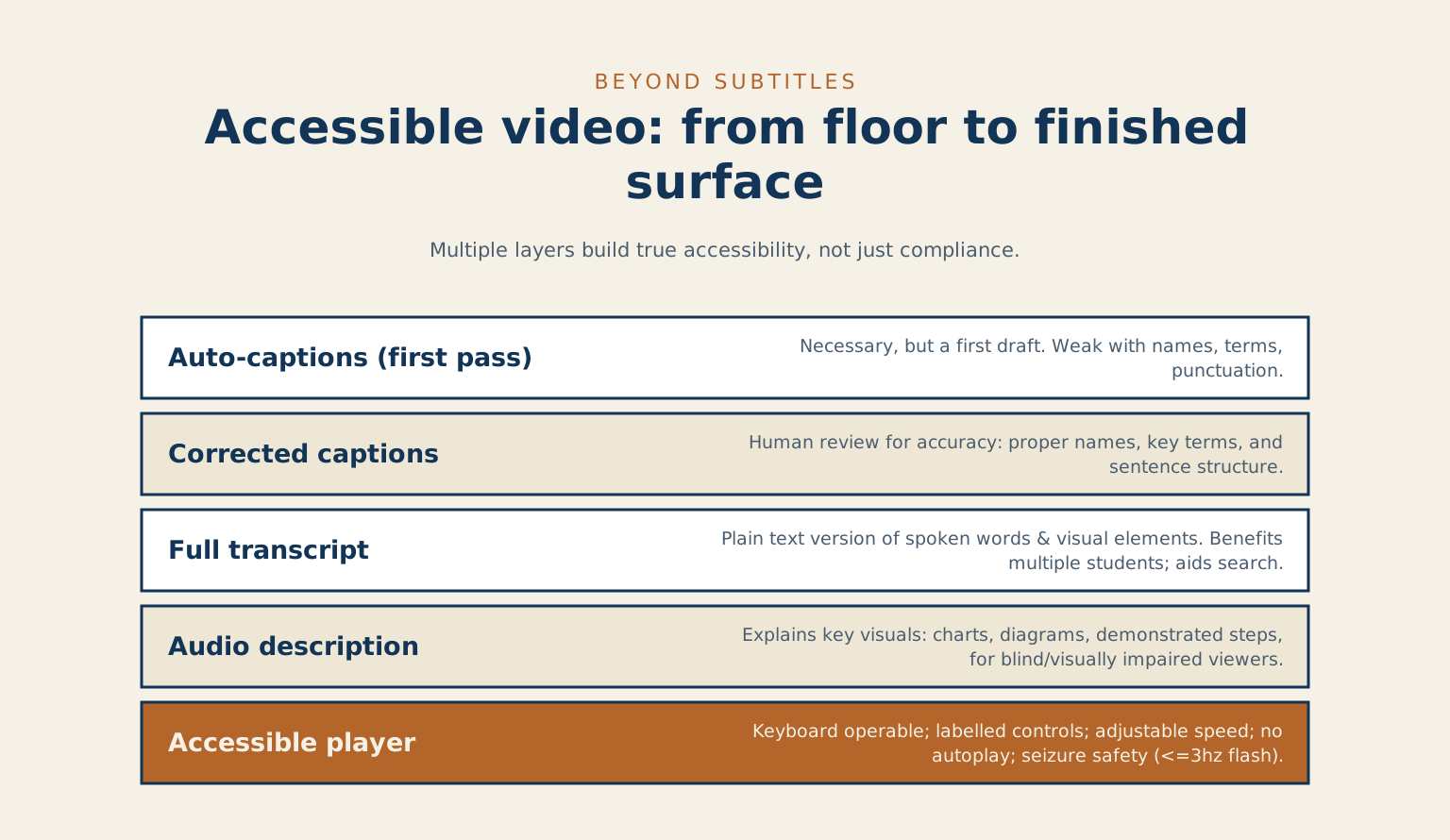
Nobody who has finished a wooden tabletop would sand it once and call it done. Sanding is the first pass of many: sand, seal, first coat, sand again, more coats, rub it out. Skip the steps after the first and you have bare wood that photographs fine and fails the moment someone puts a warm mug on it. Auto-captions are that first pass of sandpaper. Necessary, and nowhere near a finished surface.
That gap between “captions are on” and “a student can actually learn from this” is the whole subject of this piece.
Holding a vendor to it
Real accessible video in 2026 is a stack of parts working together: accurate captions, a full transcript, audio description for what matters visually, a player people can actually operate, no flashing that can trigger a seizure, readable on-screen text, and a text alternative when the video is the only place the information lives. Let me walk each one, in human terms, and name the standard behind it so you can hold a vendor or a platform to it.
The standard is WCAG, the Web Content Accessibility Guidelines. It is the reference institutions, funders and procurement offices point at, and its media rules are specific about video. I will name the relevant criteria as I go so you can look them up and cite them.
Why accurate captions aren’t the same as auto-captions
WCAG calls for captions on prerecorded video (success criterion 1.2.2). The word doing the work there is captions, and the unwritten word is accurate. Those captions carry more than dialogue: the same page says they identify who is speaking and include meaningful sound effects.
What auto-captions get wrong
Auto-captioning has become very good at ordinary conversational speech. It is still weak at exactly the things that carry the meaning in a lecture: proper names, discipline-specific terms, acronyms, numbers, and punctuation. YouTube’s own help page says automatic captions might misrepresent the spoken content because of mispronunciations, accents, dialects or background noise. A caption track with no sentence breaks and a mangled key term reads like a transcript of a guess, and a deaf student cannot learn from a guess.
The correction pass
The practical rule I hold: auto-captions are a first draft, and a human who knows the material corrects them before the video is called done. W3C’s guidance on captions says automatically generated captions do not meet user needs or accessibility requirements unless they are confirmed to be fully accurate. That correction pass is where the names come back, the terms get spelled right, and the punctuation returns so a sentence reads as a sentence. On a one-hour lecture it is a modest job. W3C notes that people with the software, skills and experience develop captions much faster. Skipping it is the difference between a caption and a compliance decoration.
What a transcript and audio description add
Two more parts of the stack, and they protect two different students.
Who a full transcript helps
A full transcript is a plain-text version of everything spoken and everything shown that matters. It helps the student on a phone on transit who cannot play sound, the student who reads faster than the video talks, the student who wants to search the lecture for the one part they need, and the screen-reader user who would rather read than scrub. W3C’s transcripts page describes a basic transcript as a text version of the speech and non-speech audio, and a descriptive transcript adds the visual information too.
W3C’s planning page develops the transcript from the text of the caption files, so the work pays for itself more than once. For prerecorded video, WCAG success criterion 1.2.3 asks for audio description or a descriptive transcript, and that is a Level A requirement.
When the picture carries the point
Audio description covers what the eyes get that the ears do not. If the lecturer says “as you can see here” and points at an unlabelled diagram, a blind student just lost the point. Audio description is a spoken track, or a scripted alternative, that says out loud what is on screen: the values on the chart and the thing being pointed at. WCAG asks for this on prerecorded video (criterion 1.2.5, with 1.2.3 accepting a descriptive transcript instead).
The good news for a lot of teaching video is that the fix is upstream and free: coach presenters to narrate what they show. W3C’s description page calls this integrated description, where the description is woven into the script for the main speaker. “The line climbs to sixty percent by week three” serves everyone and needs no separate track at all.
Why the video player itself has to be accessible
You can get every track right and still shut people out at the player. This is the part teams forget because it is invisible to anyone using a mouse and good eyes.
Keyboard, labels and focus
An accessible player is operable from the keyboard alone (criterion 2.1.1), because a lot of people cannot use a mouse. Every control, play, pause, volume, captions, speed, has a real label a screen reader can announce, rather than an unlabelled icon. Controls are visible and do not vanish. W3C’s media player page lists keyboard support, visible focus, clear labels and sufficient contrast among what a player needs.
Motion, speed and flashing
Video does not autoplay, and if anything moves or plays on its own the viewer can stop it (criterion 2.2.2), which matters enormously for anyone with a cognitive or attention disability who needs the page to hold still. That criterion covers anything that starts automatically and lasts more than five seconds. Speed is adjustable, because the student who needs to slow a fast lecturer to three-quarter speed may be the student the material was hardest for. On-screen text has enough contrast to read.
And nothing flashes more than three times a second (criterion 2.3.1), because that three-per-second threshold is the line that can trigger a seizure, which is why it is a hard rule. W3C says flashing content can cause migraines, dizziness, nausea and seizures.
The branded player
The failure I see is a custom player, or an embedded one, bolted on for branding, that quietly drops keyboard support and control labels. If you are choosing or building a player, that is the thing to test first, with the mouse unplugged.
You have delivered a course four groups of students cannot take.
What accessible video actually costs, and who pays for it
Who ends up outside the course
Here is the part I want educators to sit with. The cost of inaccessible course video is not a compliance fine. It is a student who could not learn from the material everyone else got.
I am partway through a master’s in learning and technology, and the one belief that has hardened for me is that access belongs at the start of a build, as a precondition, the same way a legible font or a working link is a precondition. Treating it as a phase you schedule near the end is how it gets cut when the term runs short. When a deaf student gets garbled captions, a blind student gets no description, a commuting student gets no transcript, and a student who needed to slow it down gets a player that will not let them, you have not delivered a slightly rougher version of the course. You have delivered a course four groups of students cannot take. They notice long before any auditor does.
Making it routine
None of this requires heroics. It is a checklist you run before a video ships, and once presenters get in the habit of narrating what they show, half of it stops being extra work at all. I go through this same stack whenever I run a technical and accessibility audit, and I hold my own material to it, which is why the site carries its own accessibility statement rather than a badge and a shrug. If you want the mindset behind all of it in one story, I wrote about the restaurant with the ramp, which is really about access as a decision you make on purpose instead of a box you tick.
Where to start
Turn the auto-captions on. They are a good first pass. Then correct them, write the transcript, describe what the screen shows, and make sure a student with the mouse unplugged can still press play.
What was the last thing a set of auto-captions got wrong in a video you watched?
Related reading: accessible video is one piece of a larger question, how to teach well now that AI is in the room. That is what my series Learning to Learn With AI is about.
Getting video right is one piece of building a course every learner can finish. Accessibility that holds up under a real student, not just a compliance dashboard, is built into the learning platforms I build. If your course video stops at auto-captions and you are not sure what is slipping through, book a call and we will check it.
Common questions
Are auto-captions good enough for accessibility? As a first pass, no. Auto-captions can miss names, technical terms, and anything said over background noise. YouTube’s own help page says automatic captions might misrepresent the spoken content. They’re a useful starting draft, but someone has to read through and correct them before you can call the video accessible.
What is the difference between captions and subtitles? Subtitles assume you can hear, and just translate the spoken words into another language. Captions assume you can’t hear, so they also note who’s speaking and the meaningful sounds, like a door slamming or a phone ringing. For accessibility you want captions, not subtitles.
Do I need audio description on my videos? You need it when the picture carries information the soundtrack doesn’t say out loud. A talking-head clip where the speaker says everything that matters may not. A tutorial that points at a screen, or a chart that’s never read aloud, does, because a blind viewer would otherwise miss the point.
Transcripts and platforms
Does WCAG require transcripts? Not by that name for video. Success criterion 1.2.3 asks for audio description or a media alternative for prerecorded video, and a descriptive transcript, which W3C says includes text description of the visual information, is one way to provide the alternative. A transcript also happens to help search engines and anyone who’d rather read than watch. It’s the piece people skip and regret first.
Is YouTube captioning WCAG compliant? Only once you’ve fixed it. YouTube’s automatic captions don’t clear the bar on their own, and W3C says they need to be confirmed fully accurate, but you can upload a corrected caption file, and YouTube documents keyboard shortcuts for its player. The platform gives you the tools, the compliance comes from the work you put in.
References
- Web Content Accessibility Guidelines (WCAG) 2.2, W3C
- Understanding SC 1.2.2 Captions (Prerecorded), W3C WAI
- Understanding SC 1.2.3 Audio Description or Media Alternative (Prerecorded), W3C WAI
- Understanding SC 1.2.5 Audio Description (Prerecorded), W3C WAI
- Understanding SC 2.1.1 Keyboard, W3C WAI
- Understanding SC 2.2.2 Pause, Stop, Hide, W3C WAI
- Understanding SC 2.3.1 Three Flashes or Below Threshold, W3C WAI
- W3C WAI media guide on captions and subtitles
- How to create transcripts, from the W3C WAI media guide
- Describing visual information, W3C WAI
- Accessible media players, per W3C WAI
- Planning accessible media, W3C WAI
- Use automatic captioning, YouTube Help
Checked against W3C’s WCAG 1.2.2 page, its captions guide, transcripts guide and media player guide, and YouTube Help, on 2026-10-11.
Leave a reply