Accessibility is built into the site, not bolted onto it. The popular shortcut, the little accessibility button that pops open a menu of font and colour controls, is not accessibility. I build to the real standard from the first line of code, and I will tell you honestly what your current site would take to get there.
Building on the web since 1996, in WordPress since 2007 · accessibility built in from the first commit, AODA and WCAG 2.2 AA · WordCamp speaker at 18+ events · Fort Erie, Ontario
This page is for you if you run an Ontario organisation that has obligations under the Accessibility for Ontarians with Disabilities Act (AODA), or if you simply want a website that everyone can use, including people who get around with a keyboard, a screen reader, or a phone in bright sunlight. Maybe you have had a complaint. Maybe an audit came back with a list you did not understand. Maybe you just know the right thing when you see it. Whatever brought you here, here is how I work, in plain terms, so you can decide whether it fits.
The overlay trap
There is a whole industry built around a single line of JavaScript you drop into your site. It adds a floating button, usually a little figure in a circle, and when a visitor clicks it they get a panel of toggles: bigger text, higher contrast, a reading guide, and so on. It looks like a solution. It is cheap, it installs in minutes, and it lets a business tell itself the box is ticked. I understand the appeal completely, and I still have to tell you the truth about it.
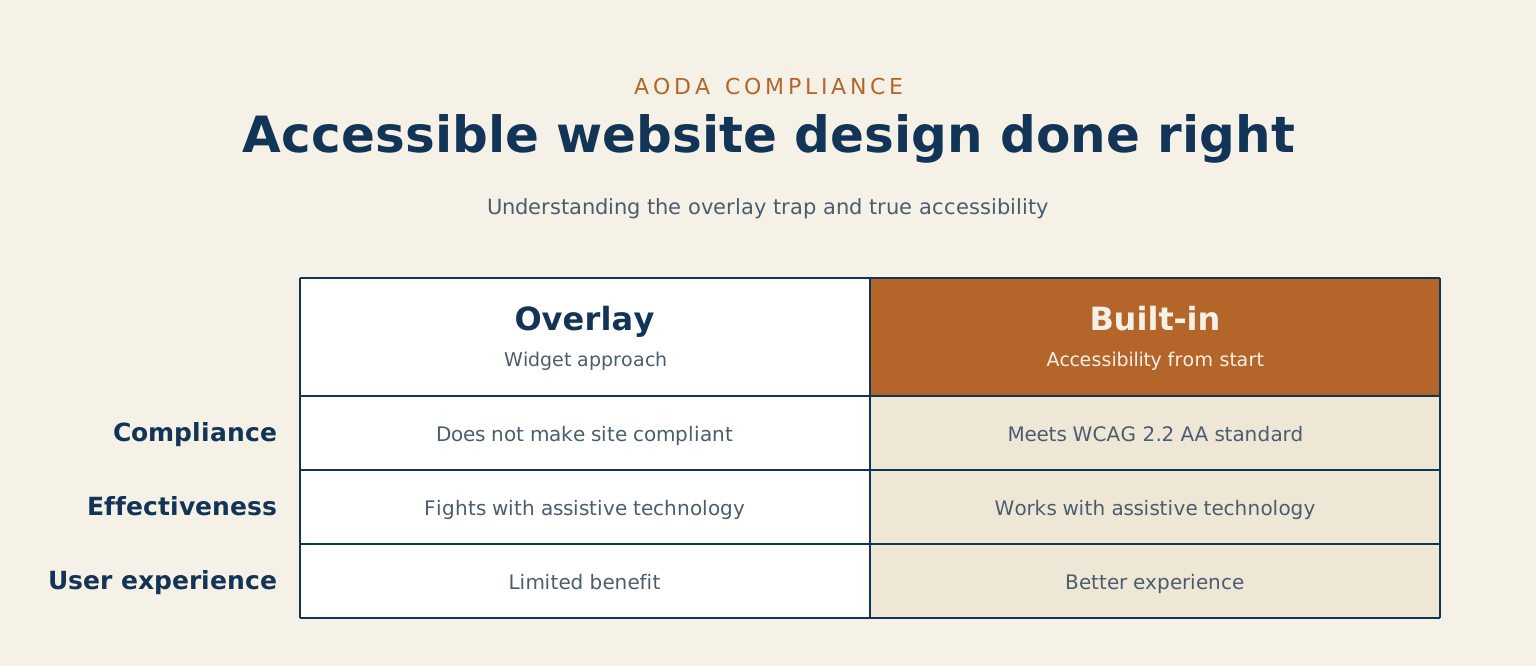
An overlay widget is like spraying air freshener into a room with a broken drain. For a minute the room smells fine, and nobody who walks in for thirty seconds notices anything wrong. But the pipe is still broken, and the person who has to live in that room knows it the moment the scent fades. The overlay sits on top of your site. It does not fix the markup underneath, and the markup underneath is where accessibility actually lives.
Two things are worth knowing plainly. First, an overlay does not make a site compliant. The standards apply to how the page is built, and a widget cannot rewrite a page it did not build. Second, the people these tools claim to help, the community of disabled users who actually depend on assistive technology, have said clearly and repeatedly that overlays get in the way more often than they help. Screen-reader users report the widget fighting with the software they already rely on. That is the part the sales page never mentions. Overlays have shown up named in accessibility lawsuits, on the wrong side, rather than protecting the businesses that installed them. My honest position is simple: an overlay is not accessibility, and I will not sell you one.
What accessible actually means
When I say a site is accessible, I mean it meets WCAG 2.2 AA, the technical standard that AODA obligations point to. That standard is not a mystery box. It comes down to a set of concrete, checkable things that are built into the page from the start:
- Semantic structure and a proper heading order, so a screen reader can move through the page the way a sighted reader skims it.
- Full keyboard operability, so every link, button, menu, and form works without a mouse.
- Colour contrast that passes, so text is readable for people with low vision or a screen washed out by sunlight.
- A visible focus indicator, so a keyboard user can always see where they are on the page.
- Accessible forms with real labels, clear instructions, and errors that are announced and explained, not just turned red.
- Alt text that carries the meaning of an image, so nothing important is lost to someone who cannot see it.
- No reliance on colour alone to carry information, so a message still lands for someone who does not perceive the colour you chose.
None of this is exotic. It is careful building. A widget cannot add any of it after the fact, because every item on that list is a decision made while the page is being written.
Why it is worth doing
I will give you the three reasons in the order I actually believe them, not the order that scares people into a purchase.
First, it is the right thing to do, and it reaches customers a broken site quietly turns away. When a form cannot be completed with a keyboard, or a menu vanishes for a screen reader, a real person gives up and goes to your competitor. You never see them leave. Fixing that is not charity, it is opening the front door you did not know was locked.
Second, in Ontario it is the law. Many Ontario organisations have obligations under the AODA, and public web content is part of that. I am not going to wave a lawsuit at you or invent a number to frighten you. I will just say plainly that the obligation is real, and building it in properly is far cheaper and calmer than being told after the fact that you fell short.
Third, and this is the part people underestimate, an accessible site is usually a better site all around. The same discipline that helps a screen-reader user, clean semantic markup, sensible headings, meaningful alt text, fast and keyboard-friendly pages, is exactly what helps Google understand your site and what helps every visitor on a slow phone. Accessibility and good engineering are not two projects. They are the same project, described from two angles.
What I do
My web accessibility services cover WCAG 2.2 AA audits, remediation, and AODA compliance reporting for Ontario businesses.
On new work, I build to WCAG 2.2 AA from the first commit. It is not a phase near the end of the project and it is not a line item you can decline. It is simply how the site gets made, the same way a good electrician wires to code because that is the job, not because you asked for the deluxe package.
On a site you already have, I audit it and tell you honestly where it stands. You get a plain report: what passes, what fails, what a real user hits when they try to use it, and what it would take to fix each thing. Then I remediate what is fixable, in priority order, so the changes that help the most people come first. I only recommend a rebuild when the foundation genuinely cannot support the standard, and if I say that, I will show you why.
Who this is for
- ✅ An Ontario organisation with obligations under the AODA that wants the work done properly.
- ✅ A business that has had an accessibility complaint or a failed audit and needs an honest read on where it really stands.
- ✅ Anyone who wants to stop quietly turning away customers who use assistive technology.
Two things worth knowing before you buy accessibility work from anyone. Accessibility overlays are sold as a one-line fix and they do not deliver compliance: the widget sits on top of the markup and an audit finds the same problems underneath it. And on a large site the real fix takes longer than a fortnight, because the only thing that fits a two-week deadline is the shortcut I have just told you not to buy. Both are worth knowing whoever you hire.
Common questions
Does an accessibility widget make my site AODA compliant?
No. I wish the honest answer were easier, but it is no. Compliance is about how the page itself is built, and a widget cannot change the markup it is sitting on top of. It can offer a few surface controls, but it cannot add semantic structure, fix keyboard traps, or repair a form that was never labelled. The disabled users these tools claim to serve broadly report that they get in the way, and overlays have appeared in accessibility complaints rather than defending against them. A widget can make a site look attended to. It cannot make it accessible.
Can you fix the site I already have, or does it need a rebuild?
Almost always I audit first, because I will not guess. Once I can see how your site is actually built, most issues turn out to be fixable in place: contrast, headings, labels, focus, alt text, and keyboard behaviour can usually be corrected without starting over. I remediate those in priority order. A rebuild only enters the conversation when the underlying foundation cannot support the standard no matter what we patch, and in that case I will walk you through exactly what I found so the decision is yours, made with the full picture in front of you.
Tell me about your project
The fastest way to a straight answer. Tell me what you need and I will reply within a business day, honestly, even when the answer is that I am not the right fit.
Prefer to talk? Call 647-641-0643
Share your project details
Use this form for project scope, technical SEO support, onsite training requests, or a focused next-step conversation.