The sticker price on a learning platform tells you almost nothing about what it will cost to run. A free license can carry the heaviest hosting bill of the three. A polished commercial product can charge you more every time your enrolment grows. The number that decides the budget is what you will have spent three or five years from now, once hosting, staffing, and support are all inside the total.
This calculator is for the person who has to defend a platform choice to whoever signs off the budget: procurement leads, agency principals, and the training-operations manager who owns the number. You give it a handful of facts about your programme, and it puts WordPress with LearnDash, Moodle, and Canvas on the same multi-year footing, so you are reading three totals that were measured the same way instead of three headline figures that never were.
Compare the multi-year total cost of running a course platform on WordPress with LearnDash, on Moodle, and on Canvas, from a few details off a procurement form.
How this is calculated
Each platform is put on the same footing: a one-time build plus the recurring cost of running it, summed across your planning horizon. This is a planning estimate, not a quote.
total = setup + (license + hosting + maintenance) × yearssetup scales with course volume; maintenance drops when you have in-house technical staffCanvas is billed per active learner, so its cost rises with headcount, with a contract minimum for small groupsHosting and maintenance figures reflect 2026 Canadian managed-hosting and agency rates for LMS-grade sites, not bargain shared hosting.
Moodle carries a free license, but its hosting is priced higher because it is heavier per user, and its maintenance higher because qualified specialists are scarcer.
The Canvas per-learner rate is a best public estimate. Instructure quotes privately, so treat that row as a planning range, not a price you can hold them to.
Moodle is free, so why is it not the cheapest?
The software is free to download. Running it is not. Moodle is heavier than a WordPress site, so it needs a bigger server, and the people who know Moodle well are rarer and charge more than a typical WordPress developer. Add those together and the free license usually gets eaten by hosting and labour. Free software is not the same as free to operate.
How does the Canvas per-learner math work?
Canvas charges by active learner each year, not one flat fee. That is friendly when you have a handful of learners and painful when you have thousands, because the bill grows every time your headcount does. With WordPress or Moodle you mostly pay for the server and the care, and 500 learners cost about the same to host as 200. Run your real headcount and your multi-year plan through the tool and watch the Canvas row climb.
When is WordPress with LearnDash the right call?
When you want to own the platform, sell or certify courses, and keep it on ordinary WordPress hosting that most developers can maintain. LearnDash is the WordPress-native middle ground: cheaper to run than Canvas, easier to staff than Moodle, and it plugs into the rest of a WordPress site you may already have. If you are already a WordPress shop, it is usually the shortest path.
What can this estimate not see?
The things that only show up in your specifics. Data migration from an old system, single sign-on with your HR tools, accessibility audits, custom reporting, and staff training time all cost real money and sit outside these bands. The tool gives you the shape of the decision and the order of magnitude. A short conversation about your situation gives you the number you can budget against.
How much does a Moodle LMS cost?
The licence is free and the platform is not. At 500 active learners over three years, with hosting and maintenance bought in and no in-house technical staff, this calculator puts Moodle near fifty thousand dollars, which is above WordPress with LearnDash and below Canvas. The cost is in hosting it well and in the specialists who run it, who are harder to find and price accordingly.
What this calculator compares
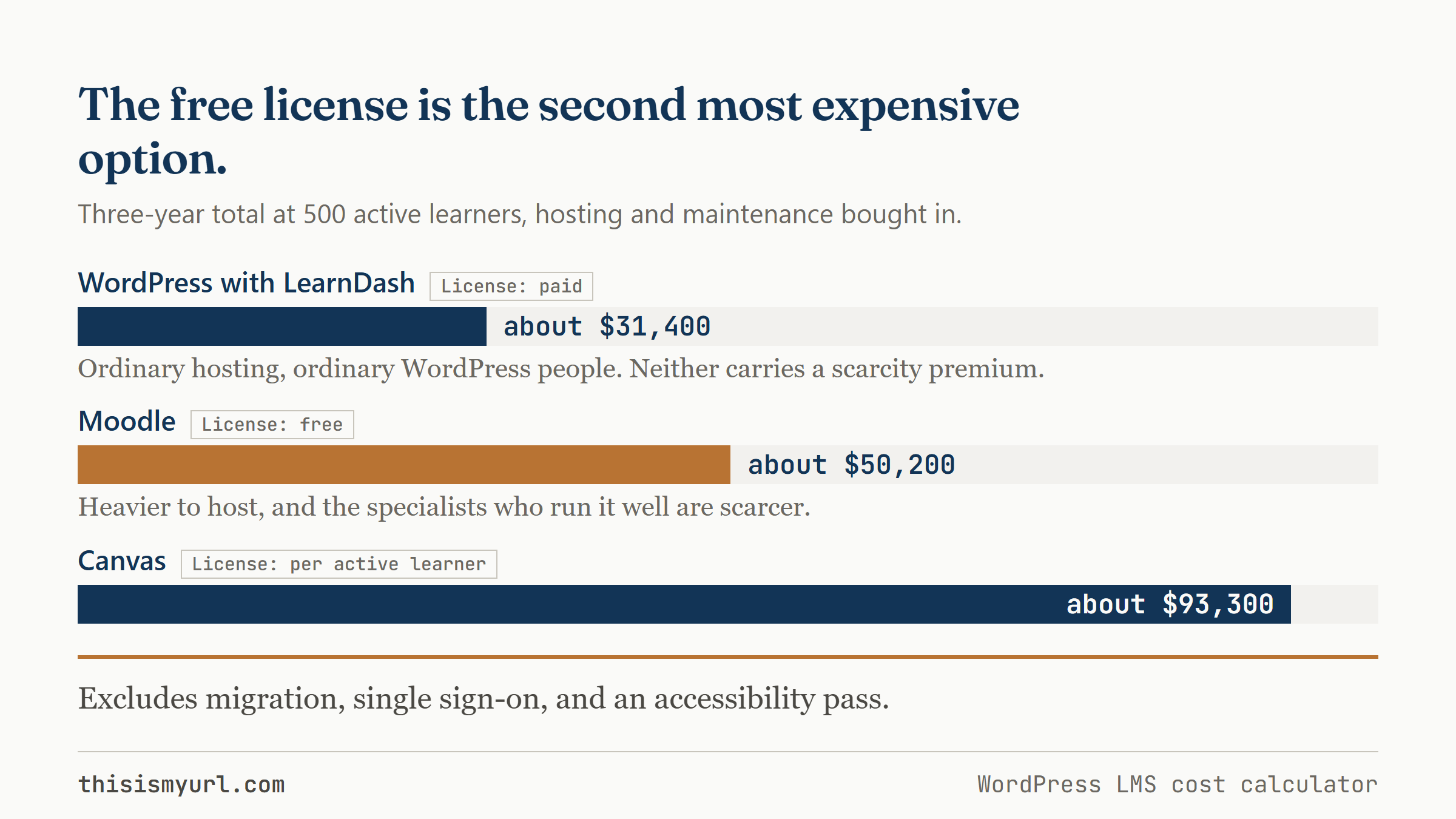
Moodle’s license is free, and that is real. For a training team with 500 active learners and no in-house technical staff, Moodle still runs to about $50,200 over three years once hosting, maintenance and specialist labour are inside the total. WordPress with LearnDash lands near $31,400 and Canvas near $93,300.
A worked example
Take a training team with 500 active learners and a moderate course library. No online store, no certificates to sell, and no in-house technical staff, so hosting and maintenance both have to be bought in. Over a three-year horizon, the calculator lands here:
| Platform | License | Three-year total | What drives the total |
|---|---|---|---|
| WordPress with LearnDash | Paid | about $31,400 | Runs on ordinary WordPress hosting and ordinary WordPress people, so neither carries a scarcity premium. |
| Moodle | Free | about $50,200 | The software is heavier to host, and the specialists who run it well are harder to find and cost more when you do. |
| Canvas | Per active learner | about $93,300 | Billed against headcount rather than usage, so the total tracks enrolment as it grows. |
Think of it the way you would two cars in a dealership. The purchase price is one line on the window sticker; fuel, insurance, and servicing are where two cars that looked identical quietly separate over five years of ownership. Moodle’s license is the free car here. But the software is heavier to host, and the specialists who run it well are harder to find and cost more when you do, so the running total climbs past the WordPress option. Canvas is billed per active learner, which is comfortable at 500 and much less comfortable at 5,000; its cost tracks your headcount rather than your usage. LearnDash sits in the middle because it runs on ordinary WordPress hosting and ordinary WordPress people, which most organisations already have on the payroll or can hire without paying a scarcity premium.
Common mistakes
- Pricing year one instead of the whole run. The first invoice is usually the smallest one you will ever pay. A choice that looks affordable on a single year’s numbers can be the most expensive over five, which is exactly the case a budget holder will ask you about later.
- Assuming free means cheapest. Moodle’s license costs nothing, and that is real. The savings can be eaten by the hosting weight and the specialist labour before the three-year mark, which is why the free option is not automatically the low-cost one.
- Not projecting Canvas billing against growth. Per-learner pricing is fine at today’s headcount and unforgiving at tomorrow’s. If your programme is expected to grow, model the enrolment you are planning for, not the one you have now.
None of these totals include the one-off work that sits outside the bands: migrating off your current system, wiring up single sign-on, and running an accessibility pass. Budget for those separately, because they land on whichever platform you choose.
Everything here runs in your browser. Nothing you type is sent anywhere or saved.
This is the same comparison I build into procurement decks for teams choosing a course platform. If you want it tuned to your real learner numbers, integrations, and migration, book a short scoping call. Book a scoping call
Leave a reply