In short: WordPress 7 shipped a connection layer rather than a chatbot: the Abilities API and an Artificial intelligence (AI) client, which let plugins and models talk to your site in a standard way. For developers it’s a new place to build. For buyers it means AI features that plug in properly instead of being bolted on.
WordPress 7.0 shipped last week with the wiring for AI built into core. I have watched WordPress releases since 2007, and the honest thing about this one is what it did not do. It did not ship a machine that thinks for you. It shipped a place to plug one in. That difference is the whole point, and it is the difference your team will actually live with.
If you want the plain feature-by-feature walkthrough first, I wrote the site-owner version here. This piece is the read from a few feet back, written for the people who will use the thing rather than the people who build the plugins. If your site runs a newsroom, a course, a membership, or a small business, an AI layer just arrived under your feet. Here is what it can honestly do, what it cannot, and why the person who owns the outcome still has to own the output.
The short version:
- WordPress 7.0 shipped the wiring for AI, not a content generator: an Abilities API, a Connectors screen, and a shared AI Client.
- A wired-in tool can draft, summarize, translate, and retag. It cannot tell whether what it wrote is true.
- The rule no version number changes: whoever owns the outcome owns the output, so a human reads it before it ships.
- What you can buy today is the standard socket. The plugins that run on it arrive across 2026 and 2027.
What actually shipped in the WordPress 7 AI layer
The headline feature is three parts: an Abilities API, a Connectors admin screen, and something called the WP AI Client. The breathless version of this story reads “WordPress ships AI.” The accurate version is quieter. WordPress shipped the connection layer, the standard socket that AI tools plug into, and nothing that generates a word on its own.
That difference is the whole point, and it is the difference your team will actually live with.
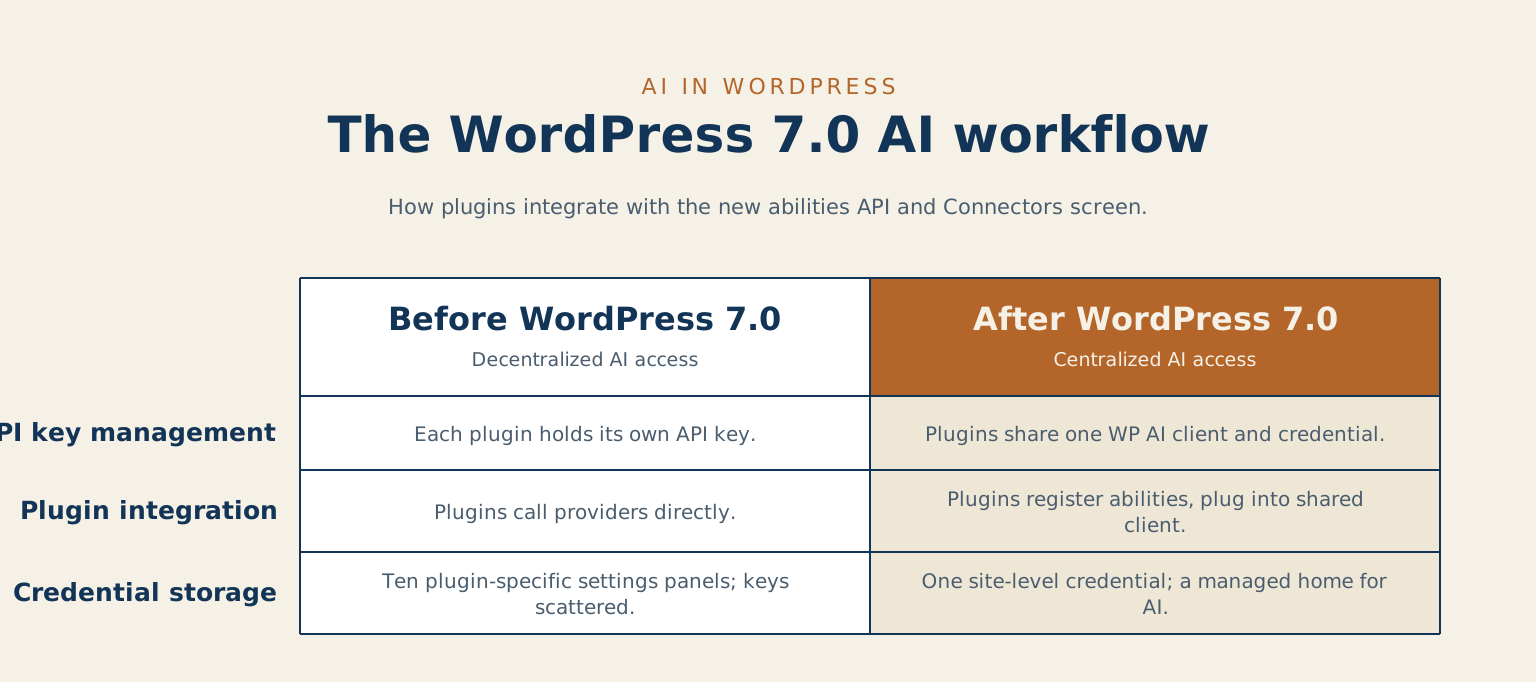
That distinction matters more than it sounds. There is still no built-in chatbot in core, no content generator, and no feature you can point a content team at today. What 7.0 ships is the contract: a standard way for plugins to register what their AI can do, and a single screen where you connect and manage those services. Behind that screen sits a client that handles the model calls so each plugin no longer has to. Your AI credentials get one managed home instead of ten separate settings panels scattered across ten plugins.
Think of it like a kitchen where every appliance came with its own proprietary outlet. The blender, the kettle, and the toaster each demand a different socket, and the moment one manufacturer raises its prices, you are stuck rewiring the wall. The Connectors screen is the standard outlet on that wall. It matters most to the people who never read a changelog and just want the thing to work when they plug it in.
I run an AI routing layer across my own client work, a decision layer that picks between a frontier model and a local one and now handles a majority of my routine output. From that seat, the plumbing point is the entire story: the wiring is what shipped, and the intelligence is whatever you choose to plug into it.
What the WordPress AI layer can do, and what it can’t
Now the part that matters once the wiring is in place. A tool wired into that AI layer can do real, useful work. It can draft a first pass at a post, summarize a long document, suggest tags, translate a page, rewrite a paragraph three ways so you can pick one. Give it a clear task with a clear input, and it will hand you something to react to faster than you could have made it yourself.
Here is the line it cannot cross, and no version number will move it. The tool does not know whether what it just wrote is true. It produces confident, fluent output whether the underlying fact is right or invented, and it has no internal sense of which one it did. Ask it for your refund policy and it will write a refund policy, fluent and plausible, that may or may not match the one you actually offer. It is a very good writer with no idea what your business promised, and it will never tell you it is unsure, because it is not.
I wrote a whole piece on this called what AI actually is, because the gap between “sounds right” and “is right” is where almost every AI mistake I clean up for clients actually lives. The AI layer in 7.0 makes that capability easier to reach. It does nothing to close that gap, because nothing in the software can.
Why a human still checks the AI output
So put a person on the output, and write that into the design.
On my own client work, that routing layer handles a majority of my routine drafting, and every bit of it passes a human before it reaches a client. The AI does the first draft. I do the deciding. That order does not reverse, and the day it does is the day the work stops being worth $275 CAD an hour. The machine is fast at producing; a person is the only thing in the loop that can be accountable for whether the thing is correct, on-brand, and safe to publish.
For a team, the rule is the same in plainer terms. Whoever owns the outcome owns the output. If a post goes out under your masthead, a human on your side read it and stood behind it, no matter how much of the first draft a tool produced. The AI layer is a faster typist, and it needs the same second editor a fast typist always did. Treat it as the capable assistant who is confidently wrong just often enough that you never sign what it hands you without reading it. It is the same pattern I describe in the two ways teaching with AI goes wrong: the tool is fine, and the trouble starts when nobody is reading.
Whoever owns the outcome owns the output.
What didn’t ship in WordPress 7, and why that matters
The same honesty runs through what WordPress chose to leave out. Real-time collaboration was on the 7.0 roadmap for months. Twelve days before release, the team announced it would not ship, because “the current approach is not solid enough,” and they published the performance testing that informed the call.
Pulling a headline feature that close to the deadline is the senior move. The team had built a version, tested it under load, and decided that shipping something fragile cost more than waiting. A platform willing to say “not ready” about the parts that are not ready is exactly the platform I trust with the AI parts that are. That is the tell worth reading: honesty about the limits is the feature.
The quieter WordPress 7 changes that matter more than the headline
A few of the smaller items will affect your team sooner than the AI story will:
- Visual Revisions gives editors a real side-by-side comparison of post versions, instead of a database row nobody opened.
- Pattern Overrides plus a new
contentOnlydefault makes design-system work simpler, but it flips what is editable by default, so any custom pattern library wants a review pass this month. - The editor now runs in an iframe, a quiet stability win.
- PHP 7.4 is the new minimum, with 8.3 the recommended floor. If your host still ships PHP 7.3, that upgrade conversation is now mandatory rather than optional.
Those four are the practical to-do list for this month, whatever you decide about AI.
What the AI layer means if you’re buying or running a team
If you are weighing WordPress against another platform this quarter, read the release for what it is. The AI infrastructure ships now. The features that will run on it arrive from the plugin ecosystem across 2026 and 2027. What you are buying today is a trajectory and the standard socket, with a year of plugin work still ahead before the AI story is something you can hand a content team without a chaperone.
If you are running an editorial team, the lift is lighter. Walk your editors through Visual Revisions and the responsive editing mode, both quiet quality-of-life wins that compound over a year. When AI-powered plugins start arriving on that new layer, adopt them the way you would hire a fast junior writer: useful from day one, supervised without exception.
I have the Connectors screen running on a staging copy of one client site this week, registering a single ability against my own routing layer just to watch how the credential handoff behaves before the rest of the directory catches up. The first time a plugin plugs into the shared client and the credential simply resolves, you will know how much of this release was real. What will not change, on that site or yours, is who reads the output before it goes live. If you would rather someone else run that experiment first, a plugin-level audit is exactly where I do it for clients.
Common questions about the WordPress 7 AI layer
Does WordPress 7 write content for you? No. It ships the connection layer: the Abilities API, the Connectors screen, and the shared AI Client, and nothing that generates a word on its own. The tools that actually write live in plugins, and those arrive across 2026 and 2027.
Do I need to do anything today? Two things. Check your PHP version, because 7.4 is now the minimum and 8.3 the recommended floor. And if you run a custom pattern library, review it, because the new contentOnly default changes what is editable.
Is it safe to let an AI plugin publish on its own? No. The tool cannot tell whether what it wrote is true, so a human owns the output every time. If AI has already gotten ahead of your review process, that is the gap my AI operations work is built to close.
Leave a reply