A while back I was partway through migrating a LearnDash course site when I lost access to the development environment. Normally that is the kind of thing that stops everything cold: no admin access, and a half-finished migration just sitting there. What saved the afternoon was an Application Password I had set up earlier with full access. Because it was a separate credential that worked over the REST API, I could reach the site from another machine, build and coordinate the migration scripts, and push the updates through remotely without ever getting back into the environment that had locked me out.
Here is the part most practitioners miss. People set these up as an API convenience for the day-to-day, a tidy way to let a sync script talk to the site. The afternoon I just described taught me the real value sits somewhere else entirely: an Application Password is a way in that keeps working when your normal way in fails. It is a continuity and recovery path first, and a convenience second. I have set one up on every site I work on ever since.
It is a continuity and recovery path first, and a convenience second.
That is the case for Application Passwords in a sentence. They let a tool, a script, or you from somewhere else act on a WordPress site without your main login, and you can cut off that access the moment you stop wanting it.
The short version:
- An application password is a separate credential that lets a tool, a script, or you from another machine reach your site through the REST API, never your main login.
- It is a recovery path first. It keeps working when your normal way into the site fails.
- You revoke any one credential on its own screen, and everything else you own stays untouched.
- It authenticates API requests only (the REST API, and by default XML-RPC too), so it cannot open wp-admin or the login screen.
- Name every credential after the tool that uses it, and give a third-party service its own user with a smaller role.
If that recovery angle is the reason you are reading this, a locked-out site is the kind of thing I handle as rescue work, and you can tell me what happened anytime.
Why revoking is the real point
When a tool holds your real WordPress login, it can do everything you can do, and the only way to cut it off is to change the password you use everywhere else too. Application Passwords exist so you never make that trade. Each one is its own credential, scoped to a single tool, and the whole value is in being able to kill it cleanly. When a contractor’s engagement ends, when a plugin you trusted turns out to have a problem, or when a key shows up somewhere it should not, you go to one screen, revoke the one credential, and you are done. Everything else you own is left untouched.
That same independence is what saved my migration afternoon. An Application Password is not tied to a browser session or a single environment, so the property that lets you revoke it cleanly is the property that lets you reach the site from anywhere. It keeps working even when the front door does not. Once you have watched that hold up under pressure, you stop thinking of these as a convenience for scripts and start treating them as the way in that survives when your normal way in fails.
Creating one, and the naming discipline that keeps it safe
Creating one of these severable credentials takes about a minute. Application Passwords have been in WordPress core since version 5.6, released in December 2020, so any current site already has them:
- In your admin, go to Users, open your Profile, and scroll to the Application Passwords section near the bottom.
- Give the new password a name that says what will use it, like “Content sync script” or “Staging backup.” Six months from now, that name is how you will know what it is and what breaks if you revoke it.
- Click Add New Application Password. WordPress shows you the generated password once, in blocks of four characters, and never again.
- Copy it immediately and store it where a machine can read it: an environment variable, a secrets manager, or the credentials store your host provides.
One thing not to do: never paste it into a script file that might end up in a Git repository. That is the single most common way these credentials leak. Email and chat threads are nearly as bad, because both get searched, forwarded, and backed up long after everyone has forgotten the credential was ever in there.
Revocation only works if you can tell, months later, which credential to revoke, which makes the naming step above the discipline the whole system rests on. Name every credential after the tool that uses it, so the list stays readable at a glance. Revoke a password the day an integration is decommissioned rather than eventually, because “eventually” is how a site ends up with nine live credentials and three known owners. And review the list now and then with one simple rule: anything you cannot immediately explain gets revoked on the spot. If something breaks, you have found the credential’s owner; if nothing does, you have closed a door that was standing open for no reason. This review is part of the standing routine on every site I maintain, and it takes about two minutes a quarter.
How they work with the REST API, and what they can’t do
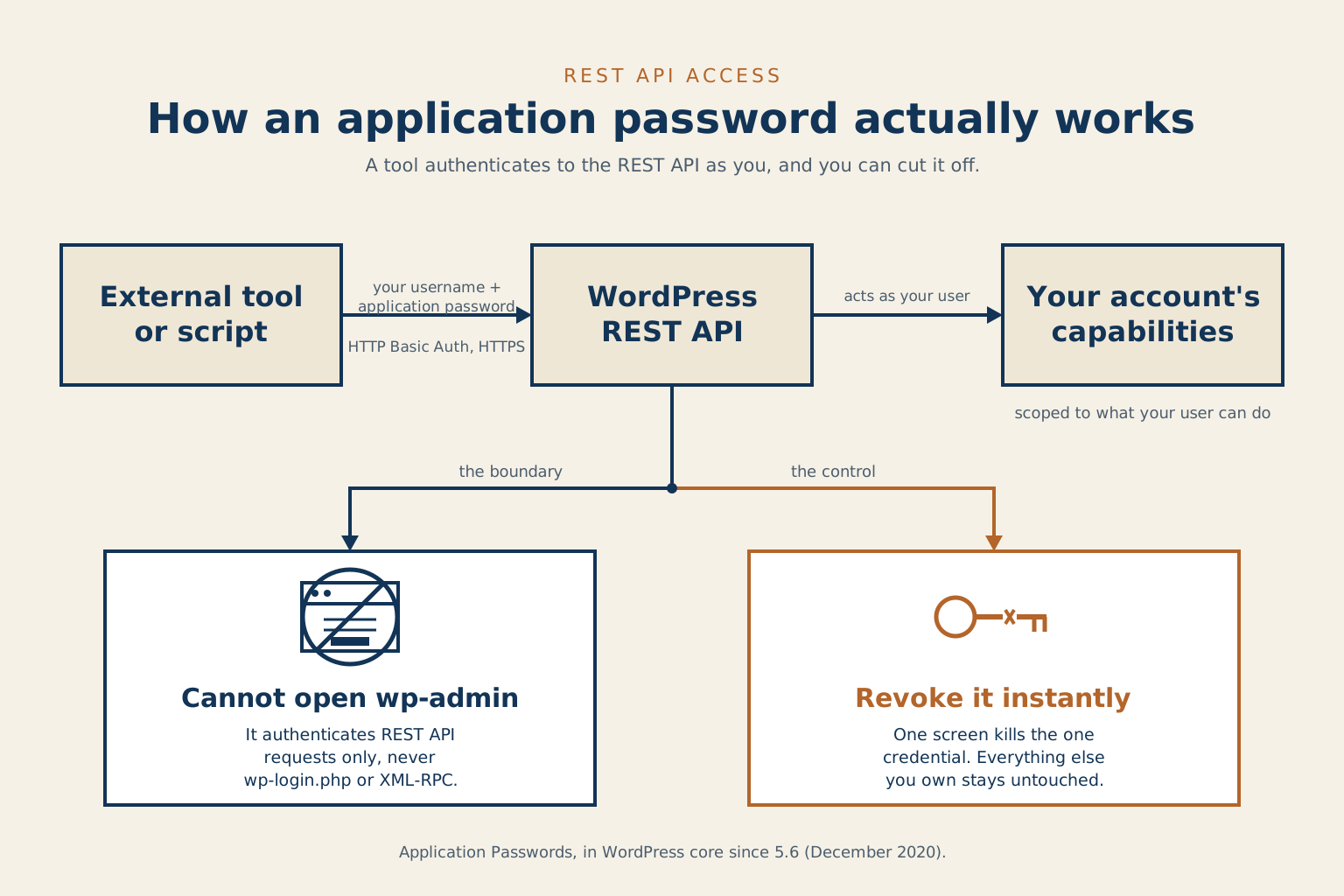
The mechanism that makes all of this possible is refreshingly plain: HTTP Basic Auth. The tool sends your WordPress username and the Application Password with every request. The spaces in the password are cosmetic, so you can keep them or drop them. A bare request with curl looks like this:
curl -u "your_username:xxxx xxxx xxxx xxxx"
  https://yoursite.com/wp-json/wp/v2/posts
The one rule that is not optional: always send it over HTTPS. Basic Auth puts the credential right in the request, so on a plain HTTP connection anyone in the path can read it. If your site is not on HTTPS yet, fix that before you wire up any integration at all.
Just as important is what an Application Password will not do. It authenticates API requests, and only those. It will not log you into wp-login.php or open the dashboard. Out of the box, core accepts it on two API surfaces: the REST API, and the older XML-RPC endpoint. That second one is worth knowing about, because XML-RPC is a broader access path with a long history of being abused, and a tool that still depends on it is one I would want a strong reason to install. If none of your integrations need XML-RPC, turn it off at the server or with a plugin, so the credential you hand out only opens the door you meant it to. The REST API is where modern WordPress integrations belong, and Application Passwords are how you let them in.
One more property worth knowing before you hand a credential to a third-party service: an Application Password carries the full capabilities of the user it belongs to. Create one on an administrator account and the tool holding it can install plugins, create users, and edit every post on the site. For an integration that only needs to read content or publish drafts, the safer pattern is a dedicated user with a smaller role, Author or Editor, with the Application Password created on that account instead. The sync script gets exactly the access its job requires, and if the credential ever leaks, the blast radius is a content role rather than the keys to the whole site.
Set up this way, Application Passwords turn site access into something you can hand out narrowly, use from anywhere, and take back cleanly. For any script or service that needs to write to WordPress, and for the afternoon something goes wrong mid-migration, that is the standard worth holding to.
Common questions
What are WordPress application passwords and why would I need one?
An application password is a separate credential you give to a tool, script, or remote connection so it can act on your WordPress site through the REST API without using your main login. The real value shows up when something goes wrong: if your normal way into the site fails, an application password set up in advance gives you a working path in from somewhere else. You can also revoke it the moment you stop needing it, without touching anything else.
Can I use a WordPress application password to log into wp-admin?
No. Application passwords authenticate API requests only (the REST API, and by default XML-RPC as well) and will not work on the wp-login.php screen. If you need to get into the dashboard, you still need your regular login credentials.
What happens when I need to cut off a tool’s access to my WordPress site?
Go to Users, open the profile where the credential lives, find the Application Passwords section, and revoke the one password that tool was using. That credential stops working immediately and everything else on the site stays exactly as it was. This is the reason to give every tool its own named credential rather than sharing your main login.
Leave a reply