Every online course, every enrolment form, every library catalogue quietly answers one question before a learner ever gets to the material: are you the kind of person this was built for? A student who reads with a screen reader or tabs through a form with a keyboard finds out the answer in the first thirty seconds. Either the door opens or it doesn’t. Accessibility is the name we give to that door, and for an institution that teaches or serves the public, it decides who gets to learn.
That is the part that gets lost when accessibility turns up as a line in a procurement contract. It arrives looking like paperwork, a box to tick before a federal-vendor deal renews, and it gets treated like paperwork. But the file behind that box is a record of a much older promise: that the people you exist to teach can actually get in. This post is about closing the gap between a site that looks like it keeps that promise and a site that can prove it.
What comes back when a submission is flagged
I’ve been in this from both sides. I’ve helped institutions prepare AODA attestation files for federal procurement, and I’ve reviewed the documentation that comes back from third-party auditors when a submission gets flagged. The pattern is consistent. The sites failing attestation review are not the ones with the worst accessibility record. They’re the ones where I’ve found no documentation at all, or documentation that stops at a Lighthouse score. I’ve yet to see a green automated score that a procurement officer could put their name to without more evidence behind it. The score tells you the machine didn’t trip. The file tells the auditor you understood what you were testing, which is whether a real person can use the thing.
Accessibility is the name we give to that door, and for an institution that teaches or serves the public, it decides who gets to learn.
If you’re a developer about to run a one-off scan the week before launch, you can close the tab with my blessing. This is for the procurement officers, operations leads, and program directors who have to produce the accessibility attestation a federal-vendor contract requires, and who have learned that a green score and a defensible file are two different documents.
What a procurement-grade audit asks for
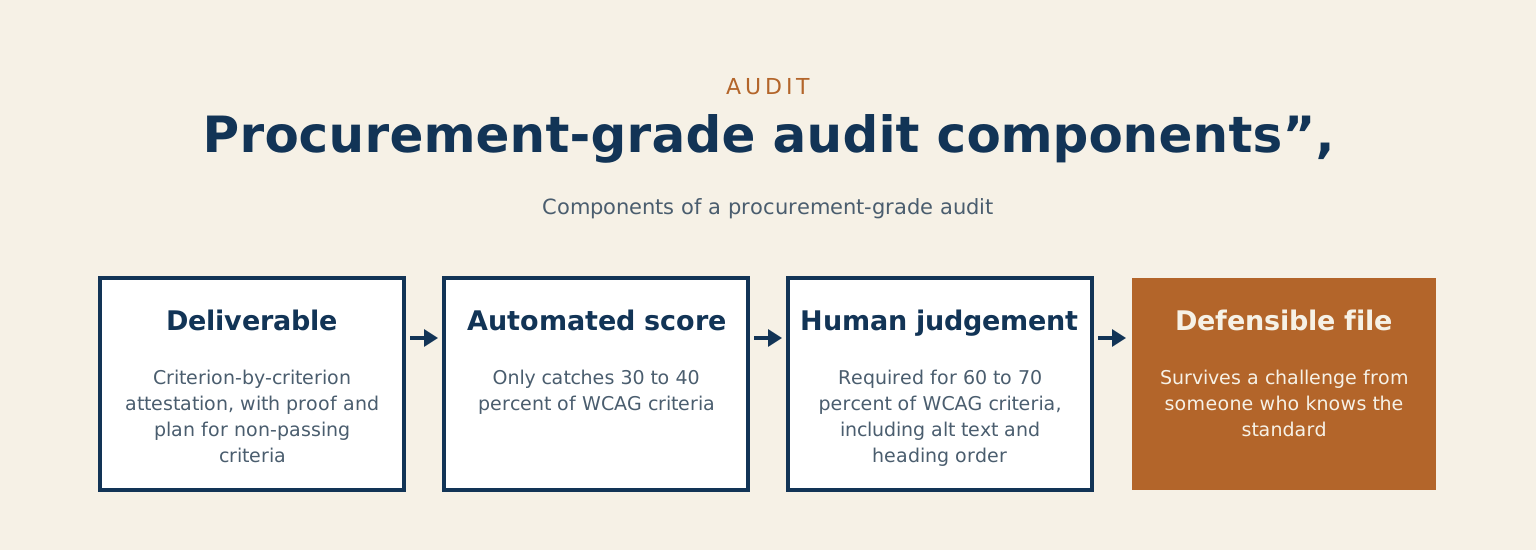
Start with the deliverable, because everything else follows from it. The audit produces a criterion-by-criterion attestation. Each relevant success criterion from the Web Content Accessibility Guidelines (WCAG) is checked, with a note on how the site meets it, a screenshot or a tester’s observation as proof, the name of the person who did the testing, and a plan with dates for anything not yet passing.
What an automated score covers
The output is a document. A score of 98 from an automated tool tells a procurement officer very little they can defend, for a reason worth understanding. Automated scanners only catch the machine-checkable criteria. Deque, the team behind the widely used axe testing engine, reports that its automated tests identified 57.38% of the issues across the audits in its sample.
A green automated score is like a smoke detector that passes its monthly test. It tells you the wiring is live. It does not tell you the building would pass a fire inspection.
The rest need human judgement: whether the alt text actually describes the image or just fills the attribute, whether the heading order tells a coherent story to someone moving through the page by structure, whether a custom form survives keyboard-only operation. And the kind of thing no scanner will ever catch, whether an error message tells the learner, in plain words, what they did wrong and how to fix it. The file is what survives a challenge from someone who knows the standard. The score is something you glance at on the way to building that file.
A green automated score is like a smoke detector that passes its monthly test. It tells you the wiring is live. It does not tell you the building would pass a fire inspection.
Where most WordPress sites quietly fail
Most of these sites run on WordPress, so let me name the three failures that turn up in audit after audit. They are the ordinary ways a learning site closes its own door.
Form labels. Contact and enrolment forms built by popular plugins can ship inputs that look labelled to a sighted visitor and read as nothing to a screen reader, because the visible text was placed beside the field rather than tied to it in the markup. It passes a glance and fails a tester. A learner using assistive technology reaches the registration form and cannot tell which box is which.
Heading order. Page builders happily let an editor pick a heading for its size rather than its level, so a page jumps from a first-level heading to a third with nothing in between. Assistive technology relies on that structure to move through a page, so when the levels are scrambled the page is genuinely harder to use than it looks to a sighted visitor scanning it. A long lesson becomes a wall with no handholds.
The slow one
A site can launch clean and decay over two or three years as staff change, each with a slightly different habit, until a real share of the images carry no useful description. WordPress treats alt text as an image detail you fill in after upload, so nothing stops the drift. An automated scan at launch would have passed. The same scan three years on finds dozens of failures the original audit never saw. Access holds up only when someone keeps tending it, and a team with no mechanism to will watch it quietly slip. The course that was open on day one is a little more closed every term.
| Failure | What assistive technology gets | How it slips through |
|---|---|---|
| Form labels | Inputs that read as nothing to a screen reader, because the visible text sits beside the field rather than being tied to it in the markup. The learner cannot tell which box is which | It passes a glance and fails a tester |
| Heading order | A page that jumps from a first-level heading to a third with nothing in between, so a long lesson becomes a wall with no handholds | Page builders let an editor pick a heading for its size rather than its level |
| The slow one: alt text drift | Over two or three years, a real share of images carry no useful description | An automated scan at launch would have passed; the same scan three years on finds dozens of failures. Nothing stops the drift |
What goes in the file
When the work is done properly, three things live in the procurement file, and none of them is a generic PDF from a scanning service.
A signed evidence log walks the criterion list, with proof and tester names against each relevant WCAG success criterion. A remediation roadmap with dates sits beside it, so a procurement officer can see what’s outstanding and when it closes. And an accessibility statement written to the rigour of that criterion list, rather than the marketing-page version, closes the set.
A generic scan PDF is none of these. It walks none of the criteria and names no tester, which makes it a marketing artefact wearing the costume of an attestation. A procurement officer who knows the difference will not put their name beside it, and neither will I.
What getting it wrong costs
The penalty for failing accessibility on a federal-vendor contract usually arrives as a renewal block rather than a fine: the contract doesn’t continue until the gap is closed, and now you’re remediating against a clock somebody else is holding. Done properly at build time, a real audit and remediation tends to run between $8,000 and $20,000, depending on the size and state of the site. Forced under a renewal-block clock, with procurement stalled and the work happening in a hurry, the same job runs $30,000 to $60,000. The expensive version starts life as “we’ll handle accessibility later.”
The larger cost never reaches the invoice: every learner who tried the door in those three years and found it shut.
The rules that anchor the conversation
This is a legal obligation, and the person signing the attestation needs to be able to name the provision it satisfies.
Ontario
In Ontario, that’s the Integrated Accessibility Standards Regulation (O. Reg. 191/11), made under the Accessibility for Ontarians with Disabilities Act. It requires public-facing websites to meet WCAG 2.0 Level AA. The province’s guidance applies that to public sector organizations and to businesses and non-profits with 50 or more employees. Note the version: the law is still pinned to 2.0, even though the guidelines have moved on twice since.
Federal
Federally, the Accessible Canada Act aims at a Canada without barriers by 2040, through identifying and removing barriers and preventing new ones, in the areas where Parliament has authority. For web content, the Treasury Board’s Standard on Web Accessibility pointed federal departments at WCAG 2.0. That standard has since been rescinded, and the same page now points to CAN/ASC – EN 301 549:2024, which Accessibility Standards Canada has adopted for use in Canada. Which version your particular contract names depends on when it was written, so read the contract rather than assuming.
If your institution sits under another province’s accessibility law, check that law’s web standard on its own.
The floor and the bar
The legal floor and the bar you should build to are different numbers. The floor is 2.0 or 2.1 AA depending on the contract. The bar a defensible audit measures against is WCAG 2.2 AA, the current guideline, whatever version the contract happens to name. Build to the bar and you clear the floor by definition. One wrinkle: WCAG 2.2 retired the 4.1.1 Parsing criterion that 2.0 still carries.
| Layer | Instrument | Standard | Note |
|---|---|---|---|
| Ontario | Integrated Accessibility Standards Regulation (O. Reg. 191/11), under the Accessibility for Ontarians with Disabilities Act | WCAG 2.0 Level AA | Applies to public sector organizations and to businesses and non-profits with 50 or more employees. Pinned to 2.0 even though the guidelines have moved on twice since |
| Federal | Accessible Canada Act, and the Treasury Board Standard on Web Accessibility (since rescinded) | WCAG 2.0 under the rescinded standard; the page now points to CAN/ASC – EN 301 549:2024 | Which version your contract names depends on when it was written, so read the contract |
| The bar to build to | Whatever the contract names | WCAG 2.2 AA | The floor is 2.0 or 2.1 AA depending on the contract. Build to the bar and you clear the floor by definition |
The broader question of which WordPress configuration fits a government contract environment, procurement compliance, platform security, support tiers and the rest, is one I walked through in the government discovery call piece.
One honest caveat: accessibility law is specific to your jurisdiction and your contract, and the directives change. This describes the framework as it stands in October 2026. The provision your attestation cites is something to confirm against your own contract and current government policy before you rely on it.
What I won’t do
I won’t sign off on an accessibility statement that hasn’t been validated against the criterion list a procurement officer can defend in front of someone who knows the standard. A generic scan PDF can’t carry that weight. Putting my name on one would help you pass the audit that doesn’t matter while failing the one that does, and the one that matters is the one a learner takes every time they try to enrol.
When you last handed an accessibility attestation to a procurement officer, what did they ask to see first?
If you’re holding a federal-vendor contract with an accessibility clause and you’re not certain your site can produce the file behind it, the honest first step is smaller than the version that waits for a renewal-block deadline, and it costs less. Preparing this file is the core of the accessibility audit work I do for institutions. If you are not certain your training would pass, book a call and we will find out together, before a complaint or a regulator does. The reason I do it is simpler than the paperwork makes it look. A course nobody can open teaches nobody.
References
- Web Content Accessibility Guidelines (WCAG) 2.2, W3C
- What’s new in WCAG 2.2, W3C WAI
- Automated testing coverage report, Deque
- Labeling controls in forms, W3C WAI
- Headings in page structure, W3C WAI
- Image block, WordPress documentation
- How to make websites accessible, Ontario.ca
- Accessible Canada Act (S.C. 2019, c. 10), Justice Laws
- Standard on Web Accessibility (rescinded), Treasury Board of Canada Secretariat
Checked against W3C’s WCAG 2.2, what’s new in 2.2, forms and headings tutorials, Deque’s coverage report, WordPress’s image block page, Ontario.ca, the Accessible Canada Act and the Treasury Board standard, on 2026-10-11.