Teachable to WordPress: the number that decides it
Whether to leave Teachable comes down to one calculation you can do in ten minutes. Here is the arithmetic, and what the move involves once the number says go.
Most people asking whether to move off Teachable™ frame it as a technical question. Underneath, it's an arithmetic one, and it has an answer you can work out in about ten minutes with last year's sales figures.
So let's do the arithmetic first, and only talk about the migration if the number says you should.
What Teachable does genuinely well
Teachable removes an enormous amount of work on day one. Payments, tax handling, video hosting, student accounts, drip scheduling, and the checkout flow all arrive working. For someone launching a first course, that head start decides whether you ship this quarter or not at all.
It also absorbs a category of problem most course creators never want to meet: sales tax across jurisdictions, failed-payment retries, chargebacks, and the compliance edges of selling digital goods internationally. Those are real costs when you handle them yourself, and they're easy to leave out of a comparison that only counts the monthly fee.
I say all this because the honest version of this decision has to price what you'd be giving up, not just what you'd be saving.
The number that decides it
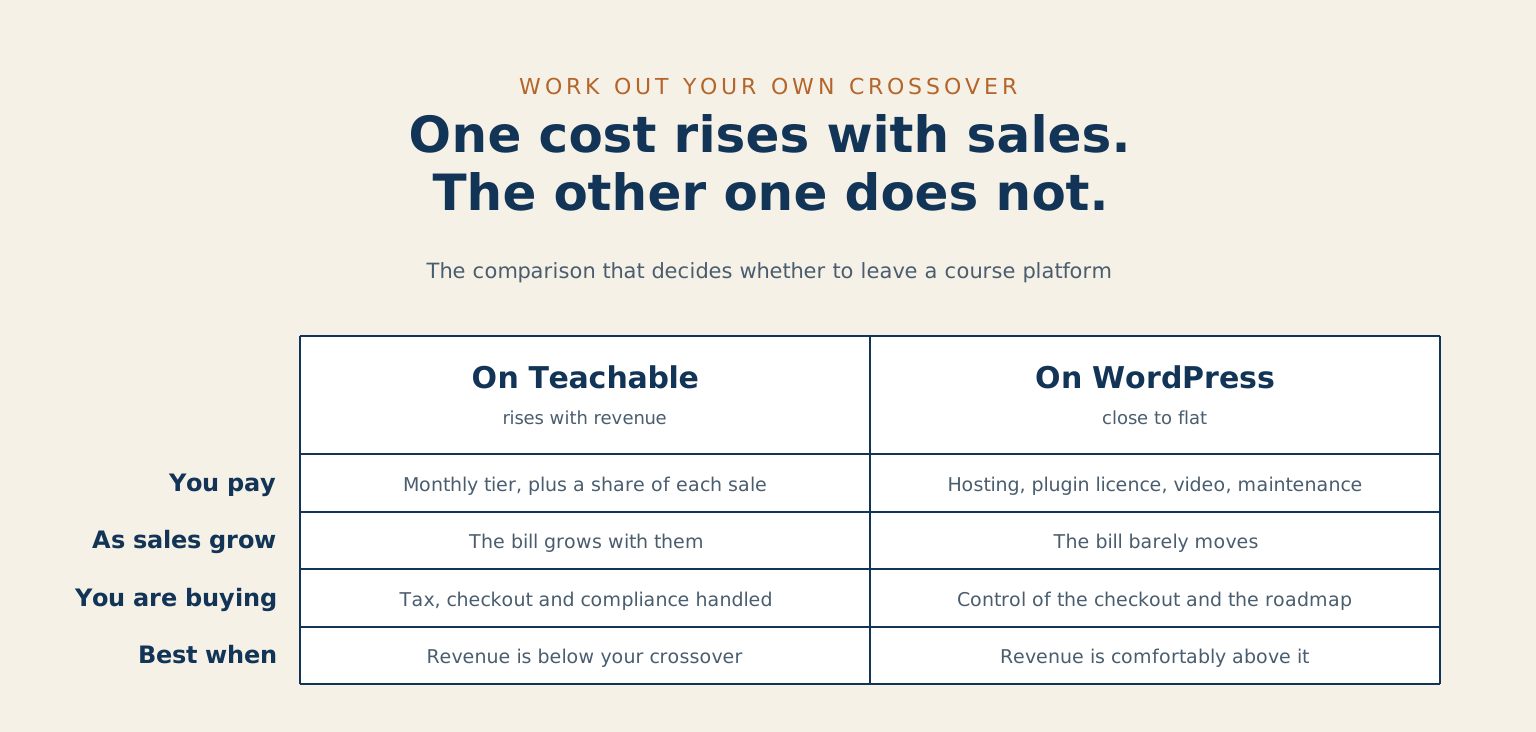
Teachable's cost has two parts: a monthly subscription that steps up through tiers, and on the lower tiers a percentage of every sale. The published tiers and current fee structure are on Teachable's pricing page, and they change, so use today's numbers rather than the ones you remember from signup.
Here's the calculation. Take last year's course revenue. Work out what you paid in platform fees, meaning the subscription plus any per-sale percentage, and leave payment-processor fees out of both sides because you'll pay those wherever you sell. Then compare that against what the same year would have cost on WordPress: hosting, a learning-management plugin licence, a payment integration, and a realistic maintenance figure for someone to keep it patched and working.
The self-hosted side is close to flat. The platform side rises with your revenue. That's the whole shape of the decision, and it means there's a crossover point somewhere in your numbers.
Below the crossover, Teachable is doing work you'd otherwise pay more to replace, and moving would be spending money to feel independent. Above it, you're paying a growing tax on your own success for infrastructure whose cost to run didn't actually grow. Both sides of that line are legitimate places to be. The point is knowing which side you're on before anyone starts quoting migrations.
One caution on the arithmetic: run it against next year, not last year. If your revenue is climbing, the crossover you're deciding about is the one you'll hit during the project, not the one you're standing on today.
What you own, and what you're renting
The second half of the decision isn't on any pricing page.
You own your course content, your videos, and your student list. Those come with you, and any platform worth using lets you export them. That's the reassuring part, and it's true.
What you're renting is the part people underestimate: your checkout flow and its conversion rate, your URLs and whatever search visibility they've earned, your email automation and the sequences built into it, and the specific shape of the student experience your reviews are describing. None of that is portable in the way a video file is. It gets rebuilt, and it gets rebuilt to a standard you've already trained your customers to expect.
That's the real cost of leaving, and it's why the arithmetic needs a margin rather than a tie. If the two columns come out close, stay. A near-tie means you'd be taking on a rebuild to save nothing.
What moves across
Course content moves cleanly. Lessons, modules, descriptions, and the files behind them all export and import with mostly mechanical effort. Video usually moves by pointing at a new host rather than by re-uploading through a course tool.
Students and enrolments move with care. You can bring the list and the record of who has access to what, but people will need to set a password on the new system, and how you handle that email is the single highest-risk moment in the whole project. Send it badly and it reads like a breach notification.
Active subscriptions are the hard part, and they're the reason some of these projects should wait. If people are paying you monthly through Teachable's billing, those payment relationships don't transfer to your own Stripe account by themselves. You're either migrating them deliberately, which is possible and worth doing properly, or you're asking subscribers to re-subscribe, which will cost you some of them. I've written about the same problem in a different setting in the Drupal migration post, because it's the pattern that decides whether a replatform is remembered well.
Completion records and quiz history usually get archived rather than migrated. Export them, keep them somewhere you can search, and start fresh on the new system. Unless you're issuing accredited certificates, that's almost always the right trade.
What the migration looks like
Build the new home first and completely, while the old one keeps selling. Nothing is announced and nothing is switched off until the replacement is genuinely finished, which removes almost all of the risk people associate with this kind of move. It’s the same build-first sequence I use on every WordPress migration project.
Then, roughly in order: stand up WordPress with your chosen learning plugin, rebuild the course structure, move the content, wire up payments in your own account, and rebuild the checkout with an eye on the conversion rate you already have rather than on how it looks.
Run a small cohort through the new system end to end before anyone else sees it. Buy your own course with a real card. The bugs that matter live in the gap between signup and first lesson, and that's a gap you can only find by walking it.
Then move students in batches rather than all at once, keep the old platform running until the last person is across, and set up redirects from your Teachable URLs to the new ones so that links in your own emails, in other people's posts, and in your existing students' bookmarks keep working.
What it costs to run it yourself
Four ongoing lines, and it's worth writing all four down because the comparison usually goes wrong by forgetting the last one.
Hosting, which for a course site with video needs to be decent rather than cheapest. A learning-management plugin licence, renewed annually. Video hosting, because serving course video from your own web host is a false economy that shows up as buffering. And maintenance: someone keeping WordPress, the plugins, and the payment integration patched and working, whether that's your time costed honestly or somebody's invoice.
That fourth line is the one that turns a good decision into a bad one when it's left out. Self-hosting is fixed rather than free. Those are different words, and the difference is the entire argument.
When staying on Teachable is the right answer
Stay if you're below the crossover. The arithmetic is the arithmetic, and there's no prize for independence that costs you money.
Stay if your course is your side project rather than your business. The maintenance line is the one that hurts most when nobody has time for it, and an unpatched course site with customer payment data on it is a worse problem than a platform fee.
Stay if you're mid-launch. Move between launches, never during one.
Move when the percentage has become a meaningful line in your accounts, when you need the course to live inside a larger site you already run, or when the thing you want to build next is something the platform won't let you build. That last one is a genuinely good reason, and it's the one people apologise for most.
Common questions about leaving Teachable
Will I lose students in the move? Some, if the password-reset email is handled carelessly. Almost none, if it's warm, expected, and sent by you rather than by a system. Tell people it's coming, tell them why, and make the first thing they see on the new site obviously yours. This is a communications job wearing a technical costume.
What happens to my active subscribers? They need deliberate handling, and the answer depends on how their payments are set up today. Work this out before committing to a date, because it's the constraint most likely to move your timeline. If you'd like a straight answer for your own setup, tell me what you're running.
Which WordPress plugin should I use? Ask what your courses actually need before shortlisting. If you sell self-paced video courses with simple quizzes, most of the well-supported options will serve you and the choice matters less than people think. If you need cohorts, structured assessment, or certification, that narrows quickly and the decision deserves real attention, and it is the kind of call I work through in my learning work.
Can I run both for a while? Yes, and I'd encourage it. Keep Teachable serving existing students while new sales go to the new site, then move the remaining cohort once you've watched the new one work under real traffic. It costs one extra month of platform fees and removes almost all of the risk.