
The Academy of Design Toronto offered private-college programs in graphic design, fashion design, and interior design: the disciplines whose prospective students judge a school by looking at student work first and reading the program description second. A design school’s front end has to function as a portfolio in itself, because that’s the language its audience already reads in.
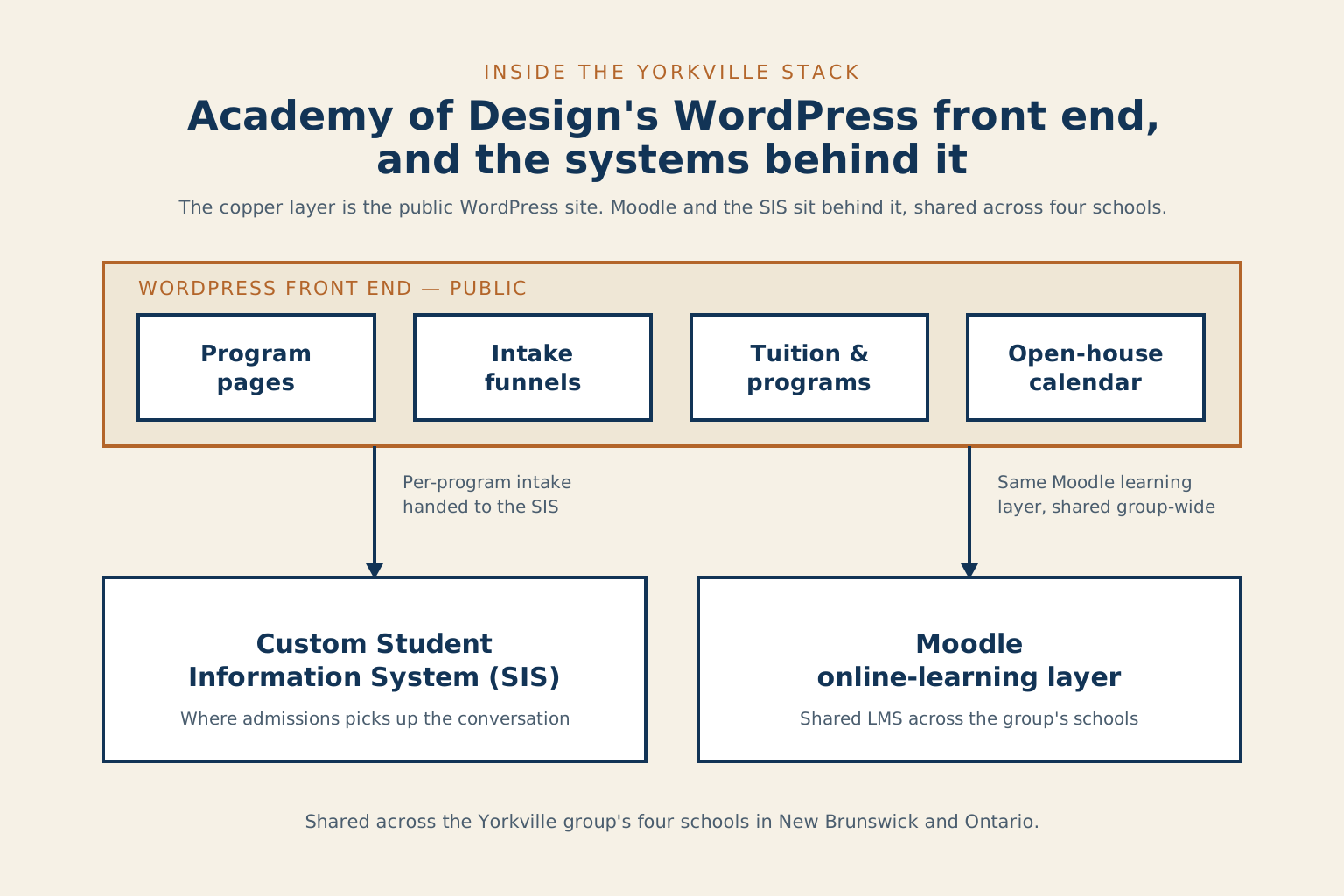
This was the WordPress front-end build for the Academy of Design Toronto during the Yorkville education group’s late-2000s technology integration. It sat on the same Moodle online-learning layer and the same custom Student Information System that served the group’s four schools across New Brunswick and Ontario. The companion portfolio entry for Yorkville University describes that broader architecture.
A front end that had to read as a design school
The prospect arriving at a design-college site is sizing up the school’s visual literacy the moment the page loads. Typography that’s off, imagery that’s generic, layout that defaults to the same template every other private college uses, any of those tells a graphic-design or fashion-design prospect that they would be paying tuition to learn from people whose own taste they don’t share. The front end had to hold its own as a piece of visual work while still doing the unglamorous jobs a college website has to do: explain the programs, name the tuition, run the intake funnels, host the open-house calendar.
Per-program intake funnels handed cleanly into the custom SIS, so an admissions advisor could pick up the conversation already knowing which design discipline the prospect was considering. The publishing rhythm and the admin patterns matched the other three schools in the group, so a marketing or admissions coordinator could move between sites and find the controls in the same places. The shared plumbing was invisible to the design-program prospect, who was reading the typography, not the platform.
- Platform: WordPress, custom theme
- Period: 2008–2009, during the Yorkville group’s integrated technology build
- Role: Director of Technology, Yorkville University, leading the technology team responsible for all four schools’ digital surfaces
- Context: One of four institutions sharing a Moodle LMS and a custom Student Information System across two provinces
Where this pattern transfers
Any creative-discipline institution: design college, art school, architecture program, fashion academy, has the same first-impression problem on its public site. The audience reads visual literacy before it reads anything else, and a default-template build telegraphs the wrong answer before the program copy has a chance to make its case. The systems behind the site can be as shared or as bespoke as the institution can afford; the public face cannot afford to look like anyone else’s.