A quiet inbox isn't a slow month: test your contact form
My best spam filter also blocked real customers, and the inbox just looked like a slow month. The ten-second monthly test every business website deserves.
For a few weeks, my website had a perfect spam record. Not one junk message. I'd built a filter I was proud of, and every time I opened a clean inbox I gave myself a small nod. The nod turned out to be premature, because the filter was also catching customers.
The filter was a honeypot, a hidden field that no human visitor can see. Spam robots read the code instead of the screen, so they fill in every field they find, including the invisible one, and any message that arrives with the hidden field completed gets thrown away without a sound. Free, and very tidy. What I'd forgotten is that browser autofill, the helpful feature that types your name and email for you, also fills in fields no human can see. My filter couldn't tell the difference between a spam robot and a busy person letting their browser do the typing, so it quietly discarded both.
A storefront doorbell that stops working never announces itself. The shop just gets quieter, and the owner starts blaming the weather, the season, the economy. My inbox was that doorbell. Real people were pressing it, and I heard nothing, and I read the silence as a slow month.
What the honeypot and the browser were each doing
Gravity Forms documents the honeypot as a hidden field where the submission is spam if the field contains a value. It also lets you choose what happens next: detected spam is either blocked and never saved, or saved as an entry marked as spam. Keeping the flagged ones is the safer setting, because a person can still review them.
Autofill is the other half. The MDN reference for the autocomplete attribute says the browser is allowed to automatically complete the input. WCAG 2.2 explains why that matters: the user is relieved of having to type the information, a significant benefit for people with memory issues, dyslexia and other disabilities. Those are visitors a business wants, so a form has to tolerate autofill rather than punish it.
Why broken forms stay broken
A broken contact form is the most expensive quiet problem a business website can have, because it presents as weak demand. You'll question your prices and rewrite your homepage long before you suspect a form that worked fine last year, since nothing on the screen looks any different. The failure hides in the one stretch of the journey neither you nor your visitors can see, the gap between the submit button and your inbox.
In my case there was even a dashboard that would have told me: my own analytics showed people visiting the contact page and no messages arriving, a mismatch that was sitting in plain view for anyone who looked. I'll admit I wasn't looking. It's the strongest argument I know for glancing at your website's numbers even in weeks when everything feels fine; those same numbers once showed me a very different quiet problem hiding in plain sight.
Real people were pressing it, and I heard nothing, and I read the silence as a slow month.
The ten-second insurance policy
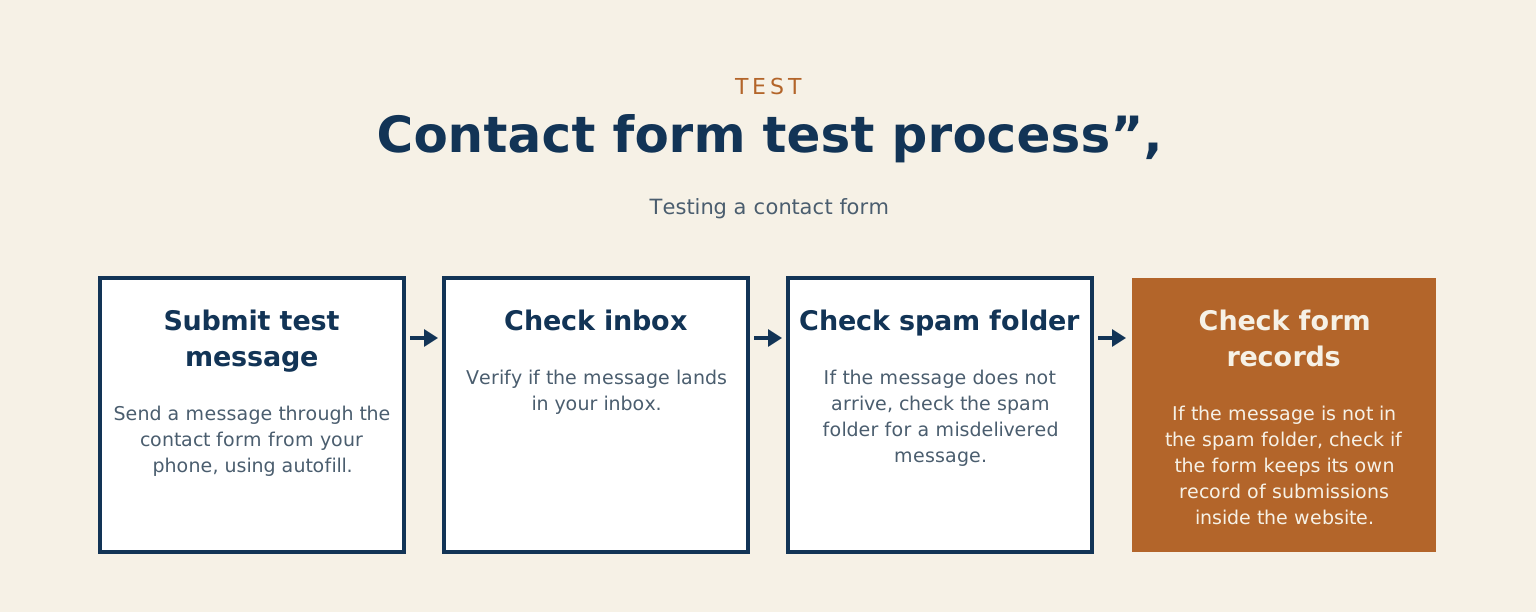
Once a month, go to your own website from your phone and send yourself a message through the contact form, exactly the way a customer would, autofill and all. Put a repeating reminder in your calendar so it actually happens. If the message lands in your inbox, you've spent ten seconds confirming the doorbell rings. If it never arrives, you've found the leak while it's still small.
And if it never arrives, resist the urge to shrug and try again later. Check your spam folder first, since a misdelivered message points at a different fix than a swallowed one. Then check whether your form keeps its own record of submissions inside the website. Finding your test message stored there but missing from your email narrows the problem to the delivery leg in about a minute. Whatever you find, you now have something specific to hand your web person, which beats "I think the form might be broken" by a mile.
Where a message can go missing
Storage and delivery are separate jobs. Contact Form 7 does not store submitted messages on its own, and Flamingo is a message storage plugin originally created for Contact Form 7 to fill that gap. Delivery has its own rules: Google's sender requirements, written for bulk senders, say that messages that aren't authenticated might be marked as spam or rejected with a 5.7.26 error.
To see what your site actually sent, the Check & Log Email plugin describes itself as a way to store sent emails for auditing purposes and to debug email related problems.
| Stage | What goes wrong | How to see it |
|---|---|---|
| Spam filter | A honeypot can't tell a spam robot from a browser's autofill filling a hidden field, so a real person's message is discarded | Set detected spam to be saved as an entry marked as spam instead of blocked, then review those entries |
| Storage | Contact Form 7 does not store submitted messages on its own | Flamingo stores them. A test message that is stored on the site but missing from your email narrows the problem to delivery |
| Delivery | Messages that aren't authenticated might be marked as spam or rejected with a 5.7.26 error | Check your spam folder first. The Check & Log Email plugin stores sent emails for auditing and debugging |
Three questions for your web person
If someone else looks after your site, whether that's a freelancer, an agency, or a maintenance plan like mine, these three questions will tell you how safe your enquiries really are. Start here: does the spam protection fail safe, meaning a wrongly-flagged human still gets stored somewhere a person can review, instead of vanishing? Then: are form submissions saved inside the website as well as emailed, so a mail hiccup can't erase a lead? And the one nobody asks: when the email provider has a bad day, how would we ever know? Good setups have calm answers to all three. If the answers come back foggy, you now know exactly what to fix, and it will cost far less than the customers it's been costing you.
Have you ever found a real enquiry sitting in a spam folder, and how long had it been there?
References
- autocomplete attribute, MDN Web Docs
- Spam detection in Gravity Forms, Gravity Forms documentation
- Success Criterion 1.3.5 Identify Input Purpose, W3C
- Flamingo, WordPress.org plugin directory
- Email sender guidelines, Google
- Check & Log Email, WordPress.org plugin directory
Checked against the Gravity Forms spam documentation, the Google sender guidelines and the Flamingo plugin page, on 2026-10-11.
The stretch between the submit button and your inbox is the one part of a website nobody looks at until it has already cost them. Checking that whole path is part of my site audit. If you are not certain your enquiries are arriving, book a call and we will find out.