Before the Excel training starts: what most teams miss
The 30 minutes a manager spends preparing their team is the single biggest variable in whether Excel training sticks. Here is the prep model, the follow-up rhythm, and the measurement framework.

I have delivered Excel training to enough teams to know there is a 30-minute task on a manager's calendar that does more for Excel training retention than anything the instructor will do on the day. Most training programs skip that 30 minutes, treat the training day as the whole engagement, and wonder why nothing changed five weeks later. This post is what the prep actually looks like, what to do during the session, and how to measure whether the day landed.
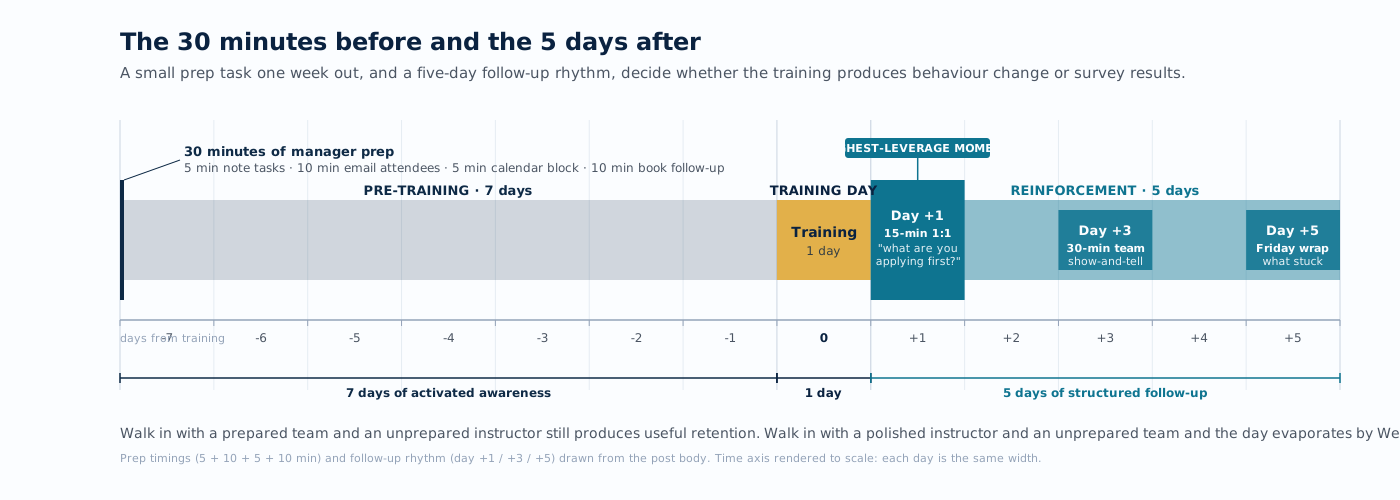
Excel training preparation is a 30-minute manager task done a week before the session. It involves identifying the team's actual Excel pain (rather than buying the generic syllabus), asking attendees to bring a real spreadsheet they're stuck on, and clearing the calendar so the team isn't half-watching email through the session. None of those steps require IT or budget. All three are commonly skipped.
The payoff is measurable in week-five productivity rather than in the immediate "did everyone enjoy the day" survey.
The hidden cost of an unprepared training day
Unprepared Excel training has a price, and it shows up in three places:
The direct cost is the visible one. Six attendees for one day at a loaded hourly rate is typically $4,000 to $8,000 in salary alone, with the training fee on top, and if the day produces no behavioural change the entire spend is sunk. The opportunity cost is quieter: the deadlines that slipped while the team was in training do not disappear, they queue up for next week, and without a prep step the team returns to that queue, applies almost none of what they learned, and the new skills atrophy from disuse. The cultural cost is the one that compounds. A training day that does not translate into real work tells the team that learning days do not count for anything, and the next time you propose training, the booking gets harder and the budget becomes harder to defend in the planning cycle.
The 30 minutes of prep is what decides which of those three cost columns the training day shows up in.
A practical 30-minute prep model for managers
One week before the session:
- Five minutes. Write down the three Excel tasks your team most often gets stuck on. Avoid generic ones like "VLOOKUP." Get specific, the way "the monthly revenue rollup that breaks every time we add a new region" is specific. An instructor can tune the day around real problems if they have them in advance, but they cannot guess at what your team actually deals with on a Monday morning.
- Ten minutes. Email the attendees with three sentences, no calendar attachment: "Bring one spreadsheet you're actively struggling with. We'll work on it during the session. The instructor will not show your data to anyone else." That message, in those exact words, is what produces the real-data session.
- Five minutes. Block the day on every attendee's calendar. Decline conflicting meetings on their behalf. Set their Slack or Teams status to "in training, will reply tomorrow." Attendees who are half-present will get half-result outcomes from the session, which isn't what the training budget was meant to buy.
- Ten minutes. Book a 15-minute follow-up meeting on each attendee's calendar for the first business day after training. The agenda is a single question: "What's the first thing from yesterday you want to apply to your work this week?"
That's the prep. Total cost is 30 minutes of the manager's time and no budget. The follow-up meetings on day one are the part of the program most often skipped, and they're the reason most training spend produces a satisfaction survey rather than a process change.
What to do during the session so learning sticks
Three behaviours that do more for week-five retention than anything on the slide deck:
Attendees work on their real spreadsheet, the one they brought from the prep step. Ten minutes of solving an actual work problem beats two hours of solving a generic example, every time. The manager attends, and is willing to be the slowest learner in the room. When the manager is visibly learning alongside the team, the team takes the day more seriously; when the manager skips because "I already know this," the team treats the day as optional too. And notes go to a shared team space rather than individual notebooks. A team SharePoint, a OneNote, or a shared Google Doc, anywhere the artefact outlives the session, because personal notebooks tend to end up in a drawer where nobody else can see what was learned.
The first five business days after training
This is where most training programs lose their return on the investment. The five-day window is when the new skill is fragile and most easily reinforced or abandoned. A practical day-by-day pattern:
| Day | What happens | Time | Who runs it |
|---|---|---|---|
| One | The follow-up meeting booked during prep, with one question: what are you applying first? The answer drives the rest of the week. | 15 minutes per attendee | Manager |
| Two | Each attendee picks one real task from their queue and applies the new technique to it, followed by a check-in, no judgement, just "how did it go?" | 5 minutes per attendee | Attendee, then manager |
| Three | Team meeting where each attendee shows the room one thing they did differently this week. This is where the cross-pollination happens. | 30 minutes | Whole team |
| Four | Identify one process the team did manually before training that the new skill could automate, and assign it to the attendee most enthusiastic about that technique. | As needed | Manager assigns, attendee owns |
| Five | Friday wrap: what stuck, what did not, and what is the request for next training. That conversation feeds the next budget cycle. | One conversation | Manager and team |
That five-day rhythm is what turns training spend into a process change. Skip it and the team will tell you the training was useful in the satisfaction survey, then never apply it to the work.
How to measure whether the training worked
The completion rate is not a measure of training success. The metrics that actually answer the question:
The measure that carries the most weight with a finance team is time-to-completion on a recurring task, taken before and after. If the monthly revenue rollup took three hours and now takes 90 minutes, that is a training outcome you can put in front of anyone. Self-reported confidence on the specific tasks targeted by the training is softer but still useful: a 1-to-5 scale, taken before training and four weeks after, where a lift is a real signal. Count the number of new techniques applied to real work in the first 30 days, drawn from the day-one follow-up meetings and the day-three sharing meetings rather than from a separate survey. And keep the manager's qualitative read in the mix. It is the least scientific of the four and often the most reliable in practice: did the team's work get noticeably better in the weeks after the training day?
Common failure patterns to avoid
The most common failure is buying the syllabus instead of designing the day. A canned curriculum is a starting point; the day succeeds when the instructor can adapt to the team's actual stuck-points, which means the prep step that surfaces those points has to happen first. Treating onsite versus virtual as a budget decision is a close second, because it is actually a learning-style decision. Virtual sessions work well for technique-heavy material where the screens are the medium of the work anyway; onsite sessions work better for confidence-building and team dynamics, where the room matters. Make the choice by what the team needs to walk out with, and let the travel-budget line follow.
The last two failures are about follow-through. Treating the manager as an exception rather than a participant means nobody can coach the new techniques into the team's daily work, and the new habits slip back to the old ones within a quarter no matter how good the session was. And skipping the follow-up meetings drops the cheapest part of the program by hours spent, the part most often cut under deadline pressure, and the reason so much training spend ends as a good survey score and nothing else.
When to bring in someone outside
Most teams can run prep, training, and reinforcement themselves with the model above. The 30-minute prep block, the day itself, and the five-day reinforcement window are all things a manager can run without bringing in outside help. Honest reasons to bring in a specialist sit narrower than the marketing usually suggests:
The team's pain is technique-specific, PivotTables, Power Query, dashboards built on imported data, and the manager does not have enough fluency in those areas to tune the syllabus alone. Or the rollout spans multiple departments where consistency matters, which takes a coordinated curriculum and a measurement framework you do not want different managers re-inventing per department. Or there is history: past training has happened, the team filled out the satisfaction survey, and nobody can point at a process or task that is measurably faster as a result. That signal usually means the day was missing either the prep, the reinforcement, or both.
When a trainer with delivery experience runs the session for the same team, the same budget, and the same training hours, the difference shows up in week-five productivity rather than the day-of survey. The prep work and the reinforcement work above are still the manager's job. The trainer's job, done well, is to tune the day to the team's specific stuck-points and help the manager set up the measurement loop so the next training cycle has data behind the decision.