WooCommerce builds for stores that have outgrown the starter theme: senior-dev architecture from day one. If your store does real revenue, holds real customer data, and the next problem is “we cannot keep duct-taping this together,” the right answer is a developer who has been inside WooCommerce since the WooThemes era.
WordPress since 2007 · custom post types, REST endpoints, Gutenberg blocks, WP-CLI, and site-specific plugin architecture · 20+ plugins published on WordPress.org · Fort Erie, Ontario
Book a 20-minute discovery call Ask a question first
The problem you’re sitting in
Most WooCommerce stores are built by stacking plugins until the cart works, then patching whatever breaks. That is a fine way to launch. It is a brutal way to scale. By the time the store is doing $50K a month in revenue, the checkout is loading 14 third-party scripts, the order metadata is split across five plugin tables, and nobody is sure which extension is responsible for the tax calculation that has been quietly wrong for nine months.
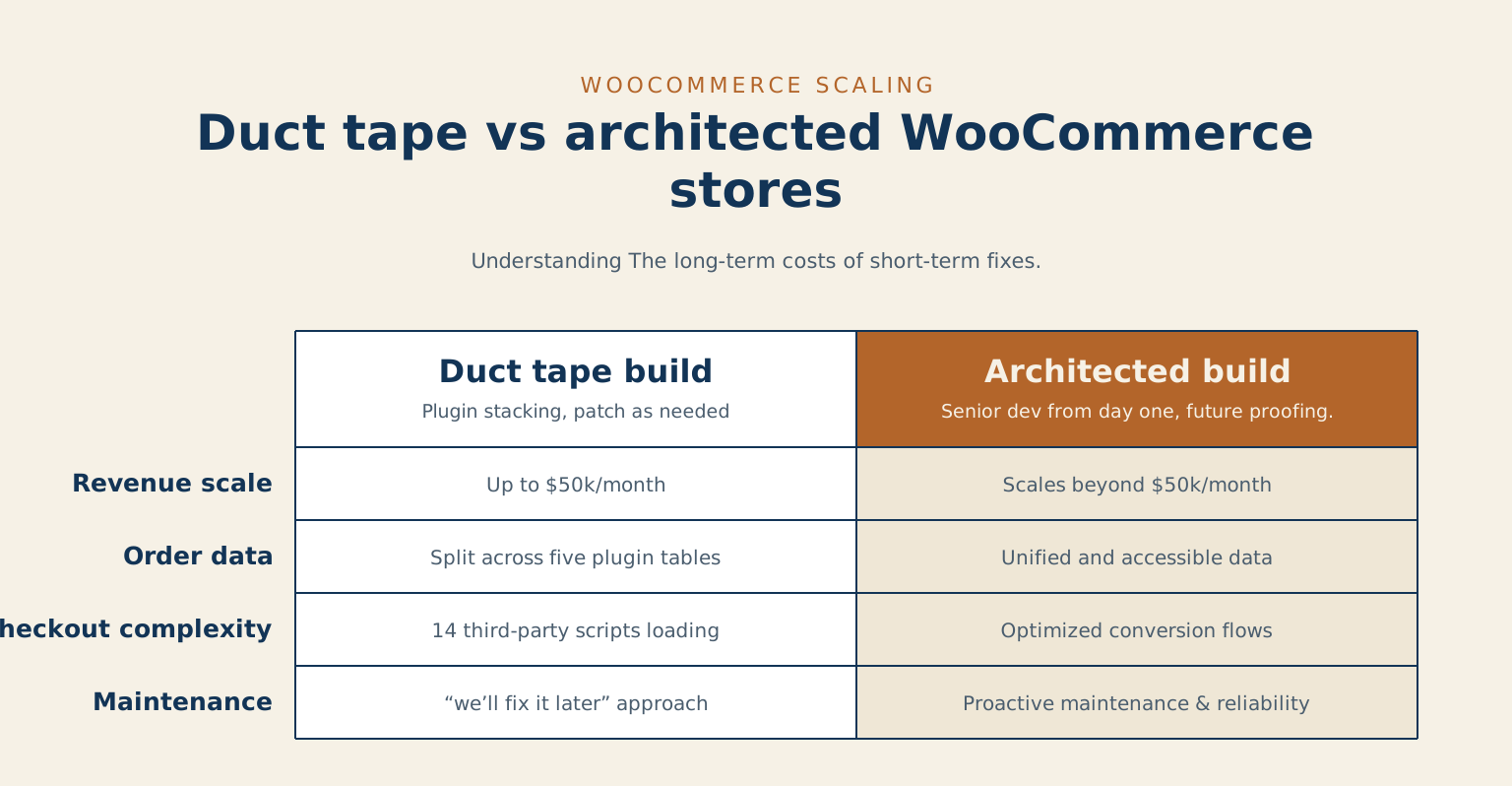
The reset is not “rebuild everything.” It is “bring in someone who can architect the next stage without throwing away what works.”
What I build for WooCommerce clients
- Storefronts that respect the brand. Theme work that uses WooCommerce’s templating properly instead of fighting it, with checkout flows tuned for conversion rather than for plugin defaults.
- B2B portals. Customer-specific pricing, account-tier visibility, gated catalogues, purchase orders, net-30 terms, and the order-volume features WooCommerce can do well when configured by someone who has done it before.
- Subscriptions. WooCommerce Subscriptions configured properly, including the failed-payment dunning logic and the customer-facing self-management portal that most stores skip.
- Payment-gateway integration. Stripe, Square, Moneris, PayPal, Apple Pay, Google Pay. Including the parts that actually take work: webhook reliability, idempotency, refund flow, and the half-failure cases.
- ERP and accounting integration. Order sync to QuickBooks, Xero, NetSuite, or your in-house ERP. Real bidirectional sync with conflict handling, not a flaky middleware layer that fails silently on the third sync of the day.
- Performance work. WooCommerce stores have a specific performance shape: cart and checkout pages are uncached, the product catalogue is heavy, the database grows fast. The work is different from generic WordPress speed work.
What this is not
- Not dropshipping ops. I do not source products, manage suppliers, or run your fulfilment.
- Not store management. I build the platform; your team runs the store.
- Not ad spend or paid acquisition. Your marketing team owns that channel.
- Not “Shopify is wrong, switch to Woo.” Sometimes Shopify is the right answer. The discovery call will say so honestly if your situation calls for it.
Who this is for
- ✅ Operating WooCommerce stores doing real revenue whose codebase has accumulated five years of “we’ll fix it later.”
- ✅ Brands launching a new store that needs to be right from day one because there is no margin for a re-launch in 18 months.
- ✅ B2B operations that need WordPress as the public surface and Woo as the commerce engine, with serious account-level customisation.
- ✅ Subscription businesses where billing reliability is a customer-trust problem, not a technical convenience.
A note on scale. Under roughly $20,000 a year in sales the architecture overhead does not pay itself back, and a hosted platform will serve you better for now. Above that, a store starts to earn what custom work costs, and the difference compounds. The cheapest builds in this market are usually the ones this page describes cleaning up afterwards, which is worth knowing before you compare quotes.
How an engagement starts
The 20-minute discovery call is free. We talk through your store today, what is actually breaking versus what is annoying, and what success looks like in six months. By the end of the call I will tell you whether the next step is a paid scoping engagement, a fixed-fee build, an audit, or a referral elsewhere.
For stores in the “we have grown into a mess and need a senior pair of eyes” zone, the WordPress Site Audit is sometimes the right first move before any build work. The audit produces the document that tells you what to fix in priority order; the build work follows from there.
Why work with me on this specifically
- WordPress development since 2007. WooCommerce work since the WooThemes era.
- Comfortable with the parts most agencies avoid: payment-gateway webhook reliability, subscription dunning, ERP sync conflict resolution, multi-currency stores, B2B price tier modelling.
- Prior portfolio work for one of Canada’s largest news networks during the 2011–2012 platform migration, where checkout-class performance and reliability work was a daily discipline.
- Independent client work, off the day-job hours at Sherwin-Williams.
Common questions
Can you work on our existing store, or does it need rebuilding?
Almost always the existing store. A rebuild is the expensive answer and it is rarely the right one: most stores that feel broken have a handful of specific problems, not a foundational one. I would rather find the three things costing you orders than sell you a project. If it genuinely does need rebuilding, I will show you why before you spend anything.
How do you work on a store that cannot go down?
Everything happens on a staging copy, and the cutover is planned before it is booked. For stores with real traffic that usually means a quiet window and a rollback that has been tested rather than assumed. A migration or a major change with no tested way back is not a plan, it is a hope.
Do you stay on afterwards?
If you want. Some clients take a monthly care plan, some take a support block they draw down, and some take the handover and run it themselves, which is a perfectly good outcome. You get the code, the documentation, and the logins either way. Nothing is built so that only I can maintain it.
When you are ready
If your WooCommerce store is doing real revenue and the architecture is starting to fight you, the 20-minute call is the lowest-friction way to figure out the next move.
Book a 20-minute discovery call Ask a question first
Tell me about your project
The fastest way to a straight answer. Tell me what you need and I will reply within a business day, honestly, even when the answer is that I am not the right fit.
Prefer to talk? Call 647-641-0643
Share your project details
Use this form for project scope, technical SEO support, onsite training requests, or a focused next-step conversation.