A Strategic Guide to Modernization with Headless WordPress Architecture
In 2026, the “traditional” monolithic website has evolved from a business asset into a strategic bottleneck. For enterprise organizations in sectors like Manufacturing, Higher Education, and Corporate L&D, the reliance on tightly coupled WordPress architectures has led to a “Technical Debt” crisis characterized by sluggish mobile performance, security vulnerabilities, and an inability to scale across modern digital channels.
Table of Contents
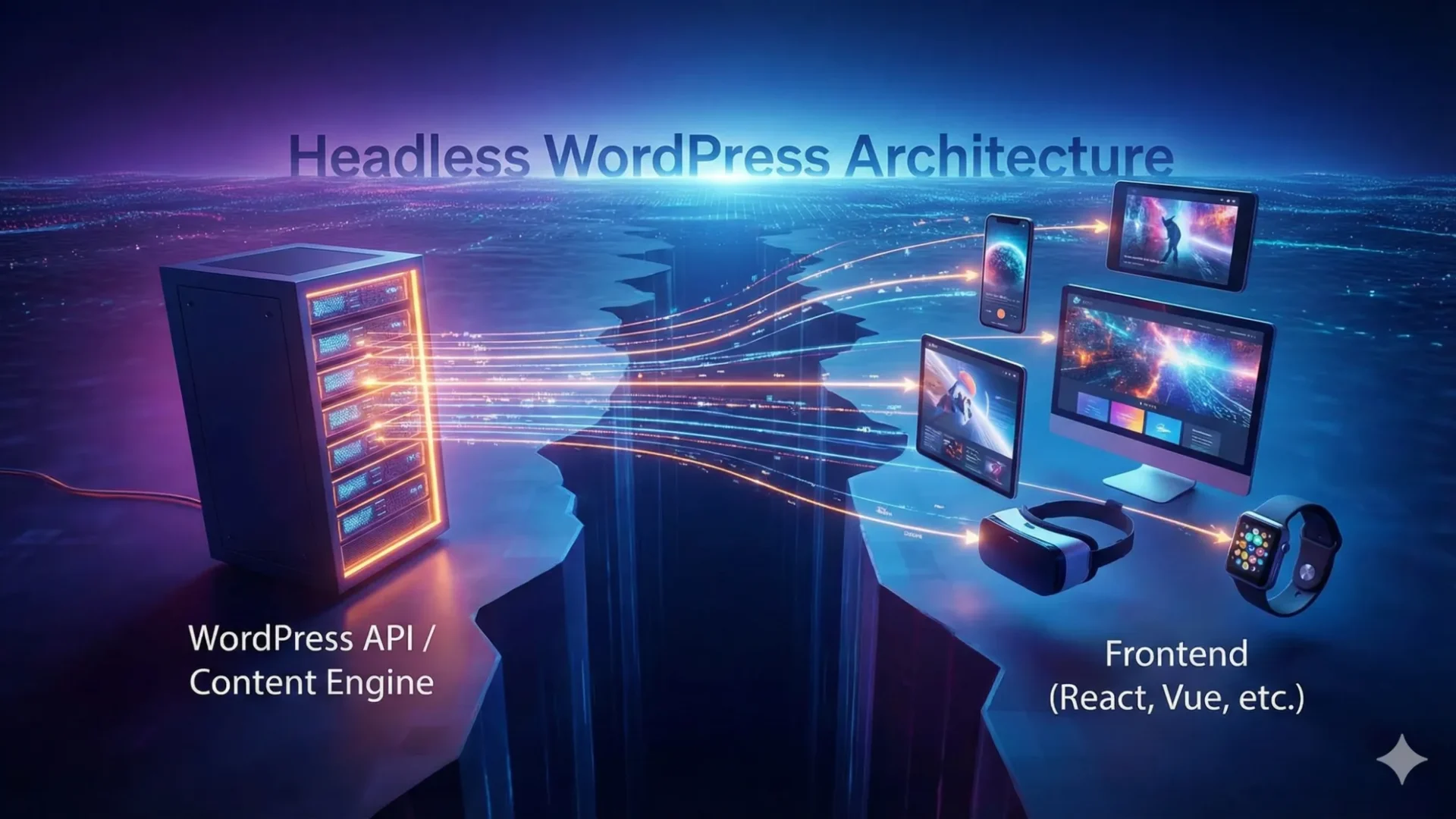
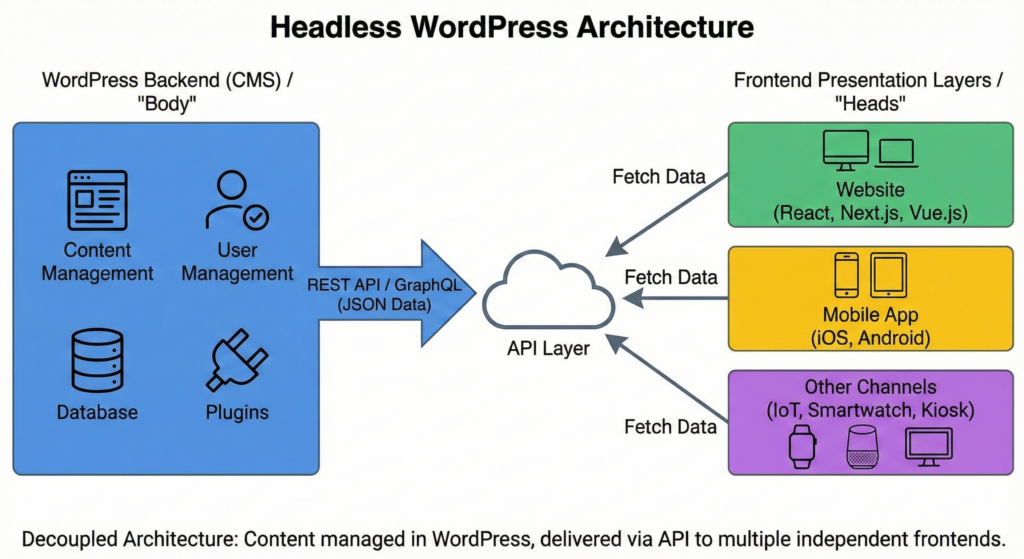
The solution is a paradigm shift toward Headless WordPress. By decoupling the back-end content management (the “Body”) from the front-end presentation layer (the “Head”), organizations can leverage WordPress’s world-class authoring experience while delivering lightning-fast, highly secure user interfaces built with modern frameworks like Next.js.
This architectural evolution eliminates “Asset Bloat” and theme limitations, enabling instantaneous page loads and a “Zero Trust” security model. Transitioning to a headless ecosystem isn’t just a technical upgrade; it’s a strategic move to reclaim your digital authority. By architecting a scalable Digital Learning Architecture, you ensure your organization is prepared for an omnichannel future where content must be fluid, performance must be perfect, and security is non-negotiable.
The 60-Second Technical Debt Audit
Ask your current developer these three questions to see if your organization is at risk:
“If our front-end is compromised, is our administrative database isolated?”
(Tests for Architectural Security).
“What percentage of our homepage CSS is actually used on the initial paint?”
(If they don’t know, you have Asset Bloat).
“How many individual database queries are triggered when we load a single course module?”
(Tests for Query Efficiency).
The Problem – The Invisible Rot of the Monolithic Monolith
This article provides a comprehensive analysis of Headless WordPress—a decoupled architectural approach that separates content management from the presentation layer. We explore the structural failures of monolithic systems, provide a diagnostic framework for measuring digital decay, and deliver a step-by-step roadmap for architecting a high-performance, future-proof digital engine.
The Architecture of Limitations
For over two decades, WordPress has dominated the web through its “monolithic” architecture. In this traditional model, the back-end (where you edit content) and the front-end (what the user sees) are tightly coupled within the same PHP-based engine. While this served small businesses well, it has become the primary bottleneck for the modern enterprise.
When your digital presence is built as a monolith, your design is restricted by your theme, your speed is limited by PHP rendering, and your security is only as strong as your weakest plugin. This creates Digital Fragmentation, where the website feels like a collection of patched-together features rather than a cohesive architectural product.
The Structural Fragility of Monolithic WordPress
The standard “monolith” approach—where the engine, the design, and the features are bolted together—eventually hits a ceiling that compromises enterprise growth. Here is a deeper look at the three primary structural failures of traditional WordPress.

The Plugin Dependency Nightmare
In a traditional setup, achieving “high-end” functionality usually means layering third-party plugins. By the time an organization adds an LMS, an RFQ form, SEO tools, and performance optimizers, the site is often burdened with 40+ active plugins.
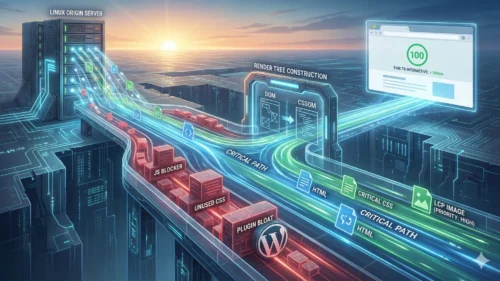
The hidden cost is Asset Bloat. Most plugins are built to work on any site, so they load their entire CSS and JavaScript libraries on every single page—even where they aren’t needed. This results in a “heavy” Document Object Model (DOM) and excessive render-blocking requests. On a mobile device, this translates to sluggish interaction and a poor Interaction to Next Paint (INP) score, directly hurting your conversion rates and search rankings.
The Trap of Theme Lock-in
In monolithic WordPress, the design (the theme) and the data (your content) are virtually inseparable. The theme doesn’t just control how things look; it often dictates how data is structured and stored.
This creates Sluggish Market Response. If your organization needs to pivot—perhaps to support a new Niagara-based tourism initiative or a specialized industrial service—you cannot simply update the “head” of the site. Instead, a major design shift often necessitates a complete migration and rebuild of the backend. This “all-or-nothing” approach makes the enterprise rigid, turning a simple brand refresh into a high-risk, multi-month engineering ordeal.
The Single Point of Failure
Because the public-facing front-end and the private administrative back-end share the same server resources and code base, they share the same fate. This is a critical risk for Business Continuity.

If a high-traffic event (like a viral blog post or a recruitment surge) hits the homepage, the resulting server strain can “lock out” your internal team from the admin dashboard, preventing them from making urgent updates. And this has happened, we often call it the Oprah effect because when Oprah Winfrey mentioned a product on the air, it immediately led to the product website crashing.
More dangerously, a security vulnerability in a minor front-end plugin provides a direct pathway to the core database. In a Headless Architecture, the public site is isolated; even if the front-end faces an attack or a traffic spike, your backend data and administrative controls remain secure and operational.
Total Administrative Isolation
In a Headless setup, the WordPress admin can be moved to a private, non-public URL (e.g., internal-cms.company.com) that is only accessible via VPN or IP-whitelisting.
“By removing the ‘head,’ you effectively eliminate 99% of common WordPress bot attacks because there is no public-facing /wp-login.php for them to target. We are essentially moving your business data behind a vault door while the public site remains a high-speed storefront.”
Why It Matters to Your Organization
For a business owner in the Niagara region—whether you’re running a manufacturing plant in Welland or a boutique winery in NOTL—technical jargon like “Headless” and “API” often feels like background noise.
However, when you translate these concepts into Revenue, Ranking, and Reach, the conversation changes. Here is how these technical shifts directly impact your bottom line.
Performance is Revenue: The “Blink of an Eye” Tax
Research shows that a 100ms delay in load time can decrease conversion rates by 7%.

The Reality: 100 milliseconds is literally faster than the human eye can blink (which takes about 300-400ms). Yet, in the digital world, your customers’ brains react to that delay before they are even consciously aware of it.
Think of your website like a physical storefront. If a customer pulls on your door and it sticks for just a half-second, they don’t think, “The hinges need oiling.” They think, “Is this place even open? Is it safe? Do I have time for this?” For a high-concurrency site—like an LMS for a corporate training firm or a busy e-commerce portal—that 100ms lag acts as a “silent tax.” If your site earns $10,000 a month, a half-second delay isn’t just a nuisance; it’s a $3,500/month hole in your pocket. Customers don’t complain about speed; they just leave and buy from the competitor whose “door” opened instantly.
SEO Devaluation: The “Invisible Business” Penalty
Google’s Core Web Vitals (LCP and CLS) are now non-negotiable ranking factors.
The Reality: In the past, you could “buy” your way to the top of Google with enough backlinks or clever keywords. Today, Google acts as a Quality Control Manager. If your site is “wobbly” (CLS)—meaning the buttons move just as a user tries to click them—Google views your business as a poor recommendation.
Legacy WordPress themes are often built like old houses with too many additions; they are heavy, creaky, and expensive to “patch” into compliance. If you are spending thousands on SEO but your site’s Largest Contentful Paint (LCP) is slow, you are essentially pouring water into a leaky bucket. Google will prioritize the “Headless” site of your competitor because it knows that user experience is the highest form of brand trust. You aren’t just losing rank; you’re losing the chance to be found at all.
Omnichannel Demand: The “One Language” Problem
Your content needs to feed mobile apps, digital kiosks, and training portals simultaneously. A monolith can only speak “HTML.”

The Reality: Imagine you’ve just written a brilliant update about your new safety protocols for your manufacturing plant. In a “Monolithic” setup, that text is trapped inside a specific webpage layout. If you want that same info to appear on the touch-screen kiosk in your lobby, or the mobile app your field technicians use, someone has to manually copy, paste, and reformat it.
A traditional website speaks HTML—it’s a “pre-packaged” meal. A Headless system treats your content like raw ingredients (Data) served via API. This means you write your update once, and it instantly flows to your website, your lobby’s digital sign, and your employees’ smartphones in the perfect format for each.
For a business looking to scale, a monolith is a tether. Headless architecture is the engine that lets your message live everywhere your customers are, without doubling your workload.
The Diagnosis – Measuring the Cost of Digital Decay
Before you can plan a solution, you must understand the depth of the problem. Use the following diagnostic framework to audit your current digital vitality.
The Lighthouse & Core Web Vitals Test
For many business owners, a website is like a car. You don’t necessarily need to know how the fuel injection system works, but you definitely need to know if the “Check Engine” light is on. When we talk about Google PageSpeed Insights, we are talking about your website’s medical report.
If your site feels “fine” to you on your high-speed office Wi-Fi, you might be missing the reality of your customers’ experience. Here is how to use professional diagnostic tools to see the truth.
Google provides a free, public tool called PageSpeed Insights. You simply plug in your URL, and Google’s “robots” visit your site from a mid-range mobile phone on a typical 4G connection.
What a Score Below 60 Really Means
If your mobile performance score is in the red or orange (below 60), your website’s Digital Architecture is failing.
- The Non-Technical Reality: A score below 60 means your site is “heavy.” It’s forcing the user’s phone to do too much work—downloading massive images, processing messy code, and fighting through “Asset Bloat.”
- The Consequence: Users on mobile devices don’t wait for “heavy” sites. They experience a “hiccup” in their day, get frustrated, and hit the back button.
The Metric: Interaction to Next Paint (INP)
This is a relatively new metric that Google uses to measure Responsiveness.
- The Technical Concept: It measures the time between a user clicking a button and the site actually showing a visual change.
- The Non-Technical Explanation: Imagine you press an elevator button and it doesn’t light up for two full seconds. You’d probably press it again, wonder if the elevator is broken, or give up and take the stairs. That “lag” between your action and the result is INP.
- The 200ms Rule: If your INP is over 200ms, your site feels “mushy” or unresponsive. In a high-stakes environment—like a Higher Ed registration portal or a Manufacturing RFQ form—that lag leads to Session Abandonment. The user assumes the form didn’t work and closes the tab.
The High-Concurrency Crisis: “Session Abandonment.”
“Concurrency” is just a fancy way of saying “lots of people using the site at once.”
Think of a traditional, monolithic website like a small local coffee shop with only one barista. If one person walks in, the service is great. But if a busload of 50 students arrives all at once (high concurrency), the barista gets overwhelmed, the line moves at a snail’s pace, and half the people in line leave without buying coffee (Session Abandonment).
Headless Architecture changes this. It turns your coffee shop into an automated, high-speed dispensing system. Because the “Head” (the part the customer sees) is separated from the “Body” (the part making the coffee), 5,000 people can walk in at once, and they all get their “coffee” instantly without the system ever slowing down.
How to Audit Your Own Site Today
- Go to PageSpeed Insights.
- Enter your website address and click Analyze.
- Look at the Mobile tab (not Desktop).
- Check your Performance Score and look for the INP metric.
If you see red or orange, your current architecture is costing you leads.
The “Asset Bloat” Audit
To a non-technical user, a website looks like a finished painting. But behind that painting is a massive amount of hidden “scaffolding” (code). If that scaffolding is too heavy or disorganized, the site won’t just be slow—it will be physically difficult for many mobile devices to display.
Here is how to check if your site is carrying too much “Digital Baggage.”
The “Hidden Suitcase”: Excess CSS and JS Files
When you visit a page, your browser has to download dozens of “instruction manuals” (called CSS for design and JS for functionality). In a traditional, monolithic WordPress site, every plugin you install adds its own manual to your “suitcase.”
- The Problem: Most sites load manuals they don’t even use. If you have a “Contact Form” plugin, it might load its 50-page manual on your Homepage, even though there’s no form there.
- The 2MB “Garbage” Rule: It is common for legacy sites to force a user to download 2MB of code just to read 200 words of text.
- The Business Impact: Imagine forcing a customer to read a 500-page operating manual just to buy a cup of coffee. They won’t do it. On a mobile data plan in a low-signal area (common in parts of Niagara), this “garbage code” makes the site feel broken.
The “Digital Jigsaw Puzzle”: DOM Size
The DOM (Document Object Model) is how a browser turns code into the layout you see. Think of it as a giant jigsaw puzzle. Every headline, every button, and every hidden container is a “puzzle piece” (called a node).
- The Diagnostic Metric: If your DOM Size exceeds 1,500 nodes, your puzzle is too complex.
- Why it Matters for Mobile: High-end iPhones can handle complex puzzles easily. But many of your potential customers are using older Androids or mid-range phones. For these devices, a 2,000-node puzzle causes the screen to freeze or stutter.
- The Page Builder Trap: Visual “drag-and-drop” page builders are the #1 cause of this. To make things easy for the designer, they create “boxes inside boxes inside boxes,” resulting in a massive, bloated puzzle that kills mobile performance.
How to See the “Baggage” Yourself
You don’t need to be a coder to see this. Try this simple “Peek Behind the Curtain”:
- Open your website in Google Chrome.
- Right-click anywhere and select Inspect.
- Look at the top of the new window that opens and click the Lighthouse tab.
- Click the Analyze page load.
- Scroll down to the “Diagnostics” section. Look for “Avoid an excessive DOM size” or “Reduce unused JavaScript.”
If Google is flagging these items, your “suitcase” is too heavy, and you are actively losing mobile visitors.
Integration Silos
Your website should be a high-speed data highway. Unfortunately, for many organizations, it acts as a “Black Hole”—information goes in (through forms or course completions), but it never comes back out in a useful way.
If your staff is manually moving information from your website to another system, your organization is suffering from a massive, hidden drain on resources.
The “Human Bridge” Problem
When two systems don’t talk to each other, a human being has to act as the bridge. This usually involves the “Copy and Paste” routine: opening an email notification, highlighting text, and manually typing it into a CRM, HRIS, or ERP.
- The Risk: Humans make mistakes. A mistyped email address or a missed digit in a part number can derail a manufacturing order or a student’s certification.
- The Cost: This is the “Integration Tax.” If a staff member spends just 30 minutes a day re-entering data, that is 10 hours a month of wasted high-value labour. Across a year, you are paying thousands of dollars for a task that a machine could do in milliseconds.
Triggering Actions
We are moving your website from a ‘passive listener’ to an ‘active participant’ in your business operations. When an RFQ is submitted, it shouldn’t just send an email. It should trigger an event that updates the CRM, notifies the plant manager’s tablet, and adds the prospect to a localized marketing funnel.
Case Study: The Corporate LMS (Higher Ed & Training)
Imagine a student completes a mandatory safety certification on your WordPress-based Learning Management System (LMS).
- The “Black Hole” Way: The data stays in WordPress. An admin has to log in, export a CSV, and manually update the company’s Human Resources Information System (HRIS).
- The Headless/API Way: The moment the student clicks “Finish,” a Webhook (an automated “push” notification) fires. It instantly updates the HRIS and triggers the next training module. No human hands involved.
Case Study: Manufacturing RFQs
For a Niagara manufacturer, an RFQ (Request for Quote) is the lifeblood of the business.
- The “Black Hole” Way: A potential client fills out a complex form. An email is sent to “Sales.” It sits in an inbox until someone manually enters the lead into the CRM (like Salesforce or HubSpot).
- The Headless/API Way: The form data feeds directly into the CRM. It automatically assigns the lead to a salesperson, tags the specific machinery the client is interested in, and sends a “Thank You” text to the prospect before your competitor has even opened their email.
How to Spot the “Integration Tax” in Your Office
Ask your team these three questions:
- “Do you ever have two windows open on your screen just to copy data from one to the other?”
- “If the website goes down, does our ability to update our customer records also stop?”
- “How many hours per week do we spend ‘cleaning up’ or importing spreadsheets from the website?”
If the answer to any of these is “Yes,” your architecture is fragmented. You aren’t just running a website; you’re running a manual data-processing factory that is eating your profits.
Calculating the Financial Cost of Inaction
Technical debt isn’t free. McKinsey estimates that technical debt can account for up to 40% of a company’s technology estate value. For an organization with a $100k annual digital budget, you are likely spending $40k just to “servicing the interest”—fixing bugs, patching old plugins, and fighting with theme limitations—rather than innovating.
| Metric | Traditional Monolith Cost | Headless Architecture ROI |
| Development Speed | Slow (Fighting theme constraints) | Fast (Component-driven development) |
| Security Risk | High (Large attack surface) | Low (Isolated API-only backend) |
| Maintenance | $15k – $30k / year | $5k – $10k / year (After initial setup) |
| Conversion Rate | Declining (Performance drag) | Optimised (Instant page transitions) |
If your current site is 2 seconds slower than the industry benchmark, you are likely suffering a 20% Performance Penalty on your total revenue. When we look at the TCO over five years, the ‘cheap’ monolithic site is actually the most expensive asset you own due to lost opportunity and inflated maintenance labour.
The Roadmap – Solving the Crisis with Headless Architecture
Headless WordPress solves these problems by “cutting off the head.” We can use WordPress purely as a Content Management API (the body) and build a custom, blazing-fast front-end (the head) using modern frameworks like Next.js or React.
This architecture allows for Static Site Generation (SSG) and Server-Side Rendering (SSR). Instead of the server building the page after the user clicks, the pages are pre-built and served from the “Network Fringe” via a CDN. The result? Instantaneous page loads.
Phase 1: The Strategic Content Audit & Modelling
Before writing a line of code, you must map your data.
- Action: Take inventory of your Custom Post Types (CPTs) and Taxonomies.
- The Link Health Strategy: This is where we implement our Semantic Link Silo logic. We ensure every piece of content is tagged and categorized so that the AI can understand the relationships between topics.
Architecting the Knowledge Graph
By using Semantic Link Silos, we ensure that Google and AI LLMs (like Gemini) can clearly see the expertise of the organization. We don’t just ‘add links’; we build a machine-readable Knowledge Graph. This ensures that as AI-driven search evolves, your organization’s data is already in the format these engines prioritize for ‘Featured Snippets’ and ‘AI Overviews.’
Phase 2: Transitioning to the API-First Backend
We don’t delete your WordPress site; we optimize it to serve data.
- Step A: Implement GraphQL (WPGraphQL). Unlike the standard REST API, GraphQL allows the front-end to request exactly the data it needs, reducing the payload size.
- Step B: Clean up the
wp_optionstable and minimize Autoloaded Data to ensure the backend is responsive to API requests.
Phase 3: Engineering the High-Performance Front-End
This is where the magic happens. We build a custom application that “consumes” your WordPress content.
- Focus on Core Web Vitals: We implement native Lazy Loading, modern image formats (WebP/AVIF), and Asset Dequeuing at the component level.
- SSO & Security: For Higher Ed or Corporate LMS, we integrate Single Sign-On (SSO) via Okta or Azure AD at the front-end level, keeping the WordPress admin completely isolated from the public.
Phase 4: Automating the Pipeline (CI/CD)
We eliminate manual uploads. We build a CI/CD Pipeline where every code change is automatically tested and deployed.
- Benefit: This ensures that your Niagara travel blog or industrial site is always stable, with 100% uptime during updates.
Phase 5: The Phased Rollout
We don’t recommend a “Big Bang” launch. We use the Strangler Application Strategy.
- Strategy: Start by moving your most performance-critical pages (like your Pillar Content or Glossary) to the headless front-end while keeping the rest of the legacy site running in the background. As confidence grows, we migrate the remaining sections.
- By moving one section at a time (like the Glossary or the Blog) to the new architecture. The user never sees a “Site Under Construction” page; they simply notice that the site gets progressively faster as more pages are migrated.
This approach minimizes deployment risk. We don’t flip a switch and hope for the best; we methodically replace legacy debt with high-performance components while maintaining 100% business continuity.
Does Headless WordPress affect our SEO?
Quite the opposite. Because the front-end is decoupled and pre-rendered (SSG), search engines index your content faster and award higher rankings due to superior Core Web Vital scores.
Will our team need to learn a new system?
No. Your content editors continue using the familiar WordPress Gutenberg interface. The technical complexity is handled entirely in the background.
Is Headless more expensive to maintain?
While the initial setup is an investment, the long-term Total Cost of Ownership (TCO) is lower because you eliminate the “security-patch treadmill” and the need for frequent, costly theme-level redesigns.
Conclusion: From Web Designer to Digital Partner
Choosing Headless WordPress is not just a technical upgrade; it is a strategic business decision. It represents a move away from the “patchwork” websites of the past toward a Digital Learning Architecture that is scalable, secure, and measurably faster.
Ready to Audit Your Digital Architecture?
If you are an IT Director or Business Owner in the Niagara region, don’t let technical debt be the anchor on your growth. I am currently offering a Technical Vitality Audit for local organizations. We will run a deep-dive analysis on your DOM size, INP responsiveness, and integration silos, providing you with a clear roadmap for modernization.