Video hosting decisions go wrong because everyone treats them as a single decision. They’re three. The right host for a marketing video that needs to rank on Google is the wrong host for a customer-portal training video, and both are the wrong host for an embedded product demo on a service page. Here is how to choose for each, and why the answer is rarely YouTube.
Quick Answer
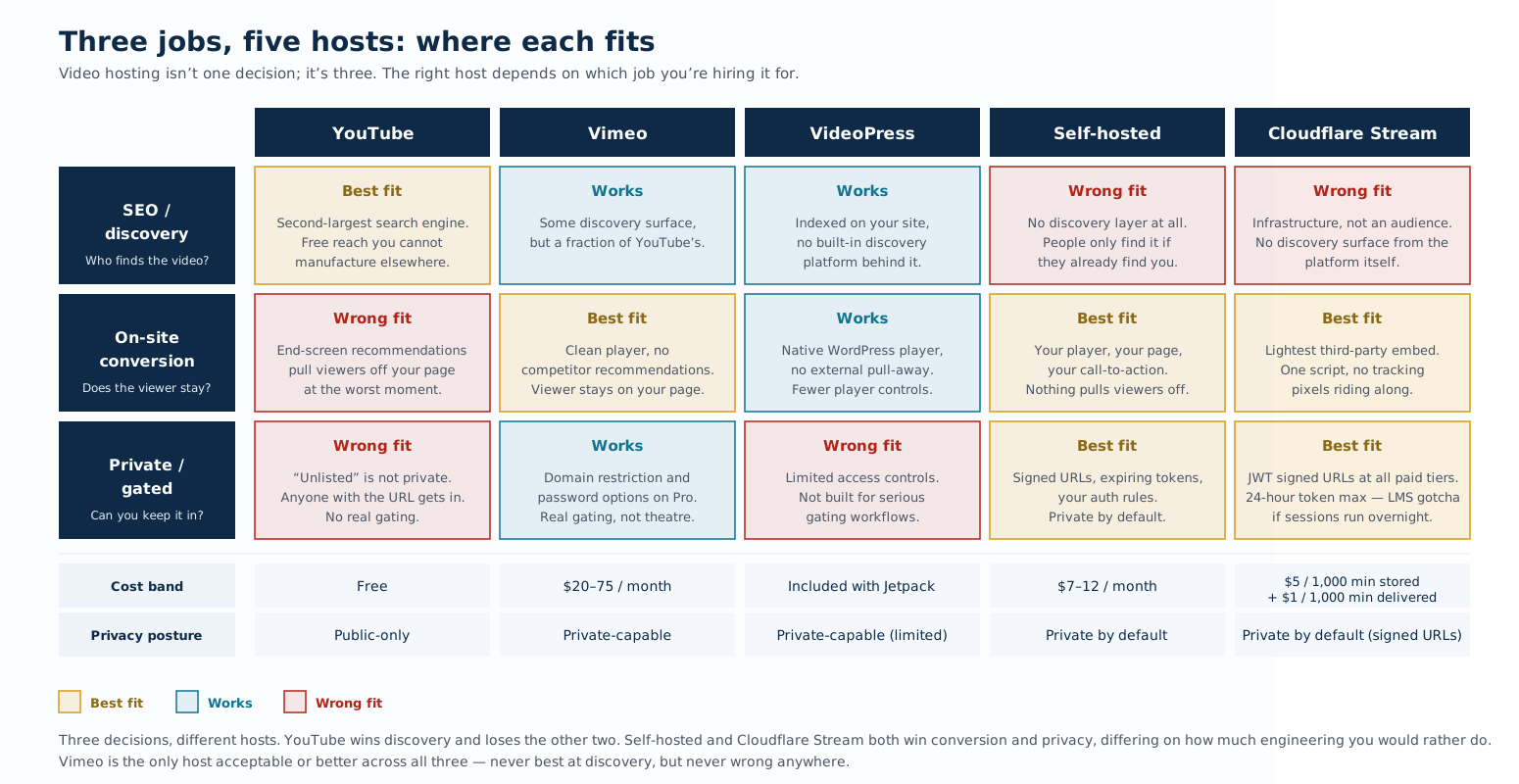
The video host you should use depends on what the video is for. Three jobs, three answers:
- SEO / discovery — YouTube. It owns the second-largest search engine in the world and Google embeds YouTube content directly into search results.
- On-site conversion — Vimeo, VideoPress, Cloudflare Stream, or self-hosted. The goal is to keep the viewer on your page through the call to action, not to expose them to YouTube’s “Up Next” carousel.
- Private / gated delivery — Vimeo Pro, VideoPress with privacy controls, Cloudflare Stream with signed URLs, or self-hosted on signed URLs. YouTube unlisted is not private.
Why YouTube is the wrong answer for service-page embeds
The embedded YouTube player on a service page is the most common video-hosting mistake, and it costs conversions in three measurable ways:
- End-screen pull-away. When the video ends, YouTube shows recommended videos — usually competitor content or unrelated topics. The viewer who watched your full pitch is now one click into another video. You spent the conversion attention and gave it away.
- Performance overhead. The YouTube embed loads 6 to 12 additional resources from google.com, ytimg.com, and doubleclick.net. On mobile, this is a measurable LCP regression and a measurable INP regression.
- Consent banner triggers. Under GDPR and now under most Canadian privacy regimes, embedding YouTube triggers a tracking-cookie disclosure. Every viewer hits a consent dialog before the video plays.
The right pattern for service pages: host on Vimeo, VideoPress, Cloudflare Stream, or self-hosted. Promote on YouTube separately if the discovery angle matters.
The five flavours that dominate in 2026
- YouTube. Free, unlimited, the only viable host for SEO-driven video. Wins discovery, loses conversion. Use it as a marketing channel, not as a player you embed in conversion paths.
- Vimeo. Paid (typically $20–75/month), no end-screen distractions, customisable player, decent privacy controls. Wins for branded marketing video and team training where the host should stay quiet. Best non-self-hosted option for service-page embeds when an audience-bearing platform feels overkill.
- VideoPress (Jetpack). WordPress-native, no third-party domain, no JavaScript bloat. Wins for sites already on Jetpack and content that lives inside post content. Loses on bandwidth allowances and on advanced privacy controls.
- Cloudflare Stream. Managed video platform from Cloudflare — upload, encode, deliver, and gate from one product. The signed-URL story is real (JWT tokens at every paid tier, not gated behind an enterprise contract), the embed is the lightest of any third-party player (one script, no tracking pixels), and the pricing model bills by minutes stored plus minutes delivered rather than by seat or tier. Strong fit for LMS and course video where every lesson needs to be gated to a logged-in learner. The thing it doesn’t do is bring an audience — Stream is infrastructure, not a discovery surface.
- Self-hosted on a CDN. Files on Cloudflare R2, Bunny.net, or AWS S3 + CloudFront, played with a clean HTML5 video element. Wins on privacy, performance, and total cost of ownership at scale. Loses on the chrome — no analytics dashboard out of the box, no automatic transcoding, you wire it up yourself.
Cloudflare Stream: the managed option most comparisons miss
Stream sits in a category most CMS-and-video comparison articles don’t have a name for. It’s not a self-hosted CDN setup (you don’t run the infrastructure). It’s not a Vimeo-style audience platform (there’s no Stream.com where people browse videos). It’s a managed video service that hands you upload, transcoding, adaptive-bitrate delivery, and signed-URL gating, billed by minutes stored and minutes delivered rather than by seat tier.
I use Stream for the WP101 LearnDash course on this site, so the read is from a working install rather than the marketing page. A few things land differently than the docs suggest:
- The embed is genuinely lighter than the alternatives. Stream’s iframe loads one script from embed.cloudflarestream.com — no Google ad tracking, no DoubleClick, no Vimeo-CDN piggyback. On a conversion page where you care about Core Web Vitals, this matters in a way the marketing copy doesn’t bother to explain.
- The signed-URL story is the real reason to pick Stream over Vimeo. JWT tokens, time-limited (up to 24 hours), optionally IP- or country-restricted, and available at every paid tier rather than locked behind Vimeo’s $75/month Advanced plan. For an LMS where every lesson needs to be gated to a logged-in learner, this is the feature.
- The pricing model genuinely changes the math. Stream bills storage and delivery as separate line items, both measured in minutes of video rather than gigabytes or viewer seats. A course with 50 minutes of total content delivered to 1,000 learners a month is on the order of CAD 1–2 a month in delivery, plus a few dollars for storage. Vimeo at the equivalent volume is the seat fee plus bandwidth tier. The Stream model rewards the use case where one video is delivered many times rather than many videos delivered occasionally.
- The 24-hour token max is a real gotcha for LMS workflows. If a learner opens a lesson, walks away, and returns the next day, the signed URL embedded in their tab has expired. The video 403s on resume. Either you reload the page (acceptable, somewhat annoying), or you wire a small JavaScript refresh that re-fetches a fresh token from your server on focus. Stream’s marketing copy doesn’t mention this; the docs do, in a way that’s easy to skim past.
Stream is not the right answer for every video. For a marketing video that needs to rank in Google’s video tab, YouTube is still the answer. For a single team training video that lives behind a password, Vimeo Pro is simpler. But for the specific job of “deliver gated video at scale without an enterprise contract and without YouTube tracking your viewers,” Stream wins cleanly enough that it deserves its own row on the matrix.
Why self-hosting on a CDN is back
Self-hosted video was unfashionable from about 2010 to 2022, mostly because bandwidth was expensive and transcoding was hard. Both problems are solved in 2026:
- CDN bandwidth is at $0.005–0.015 per GB. A 50MB video served 10,000 times runs $2.50–7.50 in bandwidth.
- Bunny.net Stream and Mux handle transcoding for a few dollars per 1,000 minutes of video, with adaptive-bitrate output. (Cloudflare Stream is the managed option above; these are the build-it-yourself alternatives.)
- The HTML5
<video>element, with a CDN-fronted MP4 source and a generated poster image, gets you 80% of what a third-party player offers without the JavaScript overhead.
For a service business shipping 10–30 videos a year, self-hosting on a CDN is now a reliable option, fast and cheap, for everything except YouTube-style discovery. The trade against Cloudflare Stream is straightforward: self-hosting gives you full control over the player and the file, in exchange for the engineering effort of wiring it all together. Stream gives you the same outcomes with the wiring done for you, in exchange for being on a managed platform rather than your own infrastructure.
Concrete cost example: a 50MB MP4 served 10,000 times in a month from Cloudflare R2 comes in around $5–10 all-in (storage + egress). Cloudflare Stream for an equivalent 5-minute video delivered 10,000 times runs about $50 in delivery minutes plus a few dollars in storage — more expensive than raw R2, less expensive than enterprise Vimeo at the same volume, and you get the player and the signed-URL gating without writing them yourself. Vimeo Pro at the equivalent volume is $25/month for the seat plus tier-based bandwidth. YouTube is “free” in dollars but charges you in attention diverted to the next-up carousel — a cost that shows up in conversion data, not in the invoice.
Technical SEO for video
If your video needs to rank on Google’s video tab or in a video-rich snippet, you need three things in place:
- VideoObject schema. Schema.org markup with
name,description,thumbnailUrl,uploadDate,durationin ISO 8601,contentUrlorembedUrl. Without this, Google can index the page but won’t surface the video card. - A poster image at 16:9, 1280×720 minimum. Google uses this in the video tab; a generic frame grab is worse than a designed thumbnail.
- A transcript on the page. Indexable text the video can be matched against. Doubles as accessibility and as long-form content for the page itself.
YouTube content gets these for free if you fill in the fields. Vimeo emits VideoObject schema from its own embed. Cloudflare Stream and self-hosted video do not emit schema by themselves; you write the JSON-LD on the page yourself. For a content team this is a one-time template task, not a per-video chore.
Common mistakes
- One host for everything. The team that puts everything on YouTube gets bad service-page conversion. The team that puts everything on Vimeo gets no organic discovery. Match the host to the job.
- Auto-play with sound. Browsers block it, users hate it, and analytics under-counts it. Auto-play muted is fine; with sound is broken.
- Forgetting the LCP poster image. The poster on a hero video is the LCP element. Treat it like any other LCP image — preloaded, properly sized, ideally WebP.
- “Unlisted” YouTube as privacy. Unlisted means anyone with the URL can watch and YouTube can index the URL pattern. It is not private. For genuinely private content, use Vimeo Pro privacy, Cloudflare Stream signed URLs, or self-hosted with signed URLs.
- Stream signed URLs without a token refresh. Stream tokens cap at 24 hours. Embed one in a page, leave the tab open overnight, and the video 403s the next morning. Wire a small refresh handler, or accept the page-reload UX.
A 30-minute decision before you commit
- List the videos you’ll publish in the next 12 months. For each, write one of three labels: discovery, conversion, private.
- Group by label. If you have more than three of any label, that group earns its own host.
- For discovery videos, default to YouTube. If the count is over 12 a year, also build a YouTube channel page strategy.
- For conversion videos, default to Vimeo or Cloudflare Stream. Vimeo for branded marketing where the polish of a curated player matters; Stream when Core Web Vitals are tight and you want the lightest embed available. Self-hosting on R2 wins the cost comparison once you cross 50 hours of total footage and you have engineering capacity to wire the player.
- For private videos, default to Cloudflare Stream with signed URLs (especially if it’s LMS or course video). Self-hosted with signed URLs is the next-best if you want full control. Vimeo Pro is the simplest if the gating bar is “behind a password” rather than “per logged-in user.”
- Whatever you pick, write down where the schema, transcript, and poster image will come from for each. If the answer is “the editor’s spare time,” the SEO part will not happen.
When to bring in someone outside
Where outside help saves real time:
- The team is migrating from YouTube embeds to a self-hosted, Stream, or Vimeo workflow and wants to preserve the SEO of pages that already rank — needs a redirect plan and schema migration plan.
- The video library has grown to 50+ pieces with no consistent host strategy and the catalogue needs to be rationalised against a measurable goal (search ranking, page conversion, support deflection).
- The decision is being made by procurement based on dashboard features rather than by editorial based on what the videos are for.
- You’re standing up Cloudflare Stream for an LMS and need the signed-URL token mint, the refresh handler, and the LearnDash-access integration done correctly the first time.
If the team is debating video hosting and nobody can articulate which job each video does, the next conversation is editorial, not technical. A specialist who’s done the discovery-vs-conversion-vs-private split before will reframe the question in a half-day and save the wrong-host year.
Read next
- Lighthouse Scores vs Real WordPress Performance. Where video weight starts costing real-world performance, and what to measure instead of the badge.
- The WordPress Site Audit Most Agencies Skip in 2026. The audit that catches video-pipeline mistakes before they hit production.
- Website Over-Optimization: How to Spot It and Fix It. The other half of the performance conversation — knowing when you’ve gone too far.
Product names referenced on this page — including Cloudflare and WordPress — are trademarks or registered trademarks of their respective owners. Training offered here is independent and is not affiliated with, endorsed by, or sponsored by any of these companies.