About
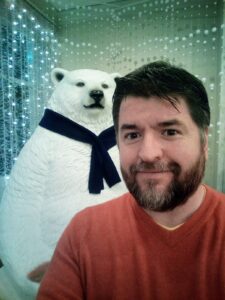
Welcome to my thisismyurl! I’m Christopher Ross, a passionate web designer, recovering photographer, teacher, and wood worker based in the beautiful Niagara region of Canada along the shores of Lake Erie where I’m not only immersed in crafting captivating digital experiences but also deeply engaged in the heartbeat of our community.
In the dynamic landscape of web development, I’ve dedicated myself to mastering the art of open source websites that not only capture attention but also tell compelling stories for the busineses I work with.
Beyond the pixels and code, I am deeply committed to giving back to the community that has given me so much. Whether it’s volunteering at local events, supporting small businesses, or collaborating with fellow creatives, I take pride in being an active participant in shaping the vibrant tapestry of life here in Niagara. And just as the rushing waters of Niagara Falls draw visitors from around the world, I strive to draw others into the world of web design through teaching and mentorship. Through workshops, tutorials, and community events, I aim to empower aspiring designers to unleash their creativity and make their mark on the digital landscape.
So, whether you’re new to the region and looking to elevate your online presence or a curious newcomer eager to explore the world of web development, I extend a warm invitation to join me on this exciting journey.
About my Work History
If you’re looking to learn about me professionally, LinkedIn is a wonderful place to read about my career and history as a technology professional. For 20 years I built web applications for leading business from newspapers to educational institutions, software, applications, and of course a handful of games. When I stepped away from software development in 2013 I pursued a love of teaching, travelled extensively, and now work as a specialist creating educational content and learning opportunities for industrial chemical companies.
I’m still available to help with web projects and from time to time you can find me speaking at open source events throughout North America to help a new generation of developers express their skills. If you’d like to say thanks for any of my previous work, images, or applications I’ve shared please feel free to make a donation to the Cochrane Polar Bear sanctuary, they’re doing great work and deserve your support.
Getting to Know Me
I make website when I find something to challenge me, but most of my free time is spent pursing a Masters degree in Learning and Technology, building wood working projects, creating new uses for technology, and being as annoying as I can be to my wonderful family, pets and friends.
Visit me if you’re in Niagara Falls, or message me on any of the social media channels listed above.